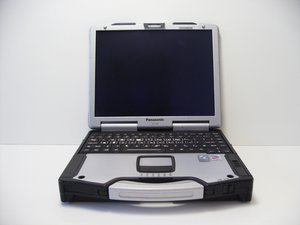
Common repairs needed include:
Screen Problems
Cracked Screen
- If your screen is cracked or broken, then follow the instructions in the Screen Replacement Manual to install a new one.
Touchscreen Stops Working
- Make sure your screen is clean. Wipe it with a lint-free and damp cloth.
- Make sure your fingers are clean and dry.
*If you need to replace your touchscreen, follow the Screen Replacement Manual
Cannot Connect to Wireless Internet
Broken Antenna
- Get close to a working wireless router.
- Connect to the router with another laptop to ensure it works.
- If the laptop in question can not detect the signal, it may be broken.
- The antenna for this computer is an external card plugged into the left side expansion bay. Take your antenna card to a local tech store for testing.
Sound Stops Functioning
Sound is playing but no noise comes out of the speakers
Speakers Go Out
- Assuming no driver of software issues:
- If Headphones were plugged into the computer, the switch that shuts the speakers off might be stuck. Spray Silicon Lubricant into the headphone jack and repeatedly plug in and unplug head phones. View this discussion for additional information.
- If speakers are broken see the Speaker Repair Guide
Computer Won't Boot Up
Computer will not turn on
Processor Quits Working
- If your processor stops functioning it will need to be replaced. See Processor Repair Guide. Also see Overheating Troubleshooting Guide (listed below) to prevent the problem from happening again.
- Faulty Trackpad
- Assuming no software issues.
- Make sure your hands are clean and dry.
- Clean surface of trackpad with a cloth dampened in rubbing alcohol.
- Move your laptop to a temperate, dry (low humidity) location.
- Assuming no software issues.
Defective Battery and Power Problems
- Preform these checks to help find out if you need to replace your battery
- Does your laptop need to be plugged in to turn on?
- Does your battery get hot? If not it may be dead.
- Put your battery in another laptop and see if it works.
- Refer to this flowchart to diagnose your power/battery problems.
- Does your laptop need to be plugged in to turn on?
- To replace your battery, follow the Battery Replacement Guide
Overheating
- Check to make sure your bottom plate is not bent. The toughbook uses the bottom plate to disperse heat through heat pads, so if the plate is bent, overheating could result. See this discussion for more help.
- To replace your heat sink, follow the Heat Sink Replacement Guide
Floppy Disks Won't Read
After inserting a floppy disk into the drive, the computer will not read and information from it
Optical Drive/CD Rom Breaks
- It isn't uncommon for the Toughbook's CD Rom door hinges to break, leaving your optical drive door hanging. The only way to repair this is to replace your hinges. For more information, view this discussion.
- To remove your optical drive, follow the Optical Guide Replacement Guide
Keyboard Input Don't Appear of Screen
Keyboard doesn't respond to user inputs
Keyboard doesn't work correctly
- The CF-29 keyboard requires more force to type than a normal keyboard due to the water tight seal on it. Stiff key are normal.
- If a key or keys don't work, barring any driver or software issue the keyboard is broken.
- If you need to replace your keyboard, follow the Keyboard Repair Guide.



3 Comments
when rebooting or turning on after (powered off) the tough stops loading and hangs for five minutes when searching for internet. it completely freezes and i cant do anything it wont even turn off. but as soon as the little circle over the internet signal display goes away its fine
Clint Field - Reply Share
there are some keys not functioning like @ sign.. if i click @ sign it appears to be ‘ only
Gaborski TV - Reply Share
After closing d lead of my Panasonic CF-53, I later open it and try to turn it on and put password… to my surprised it hangs, I can't put d password, but d mouse is working fine on d system,. U tried several times until d system display is not coming up, I use external monitor because it seems d system is working inside but d same thing… not display
Onipe Segun - Reply Share