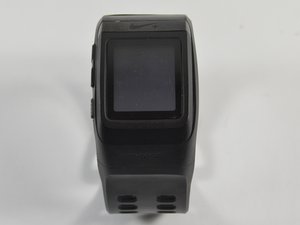
Student-Contributed Wiki
An awesome team of students from our education program made this wiki.
Details on the screen are hard to see
My screen appears foggy and the information displayed is impossible to see.
Screen is dirty
The time and date will not show up on the screen due to the fact that the screen is not clean. To clean the screen, take the screen protector out, wash it, dry it, and gently insert it back onto the watch. To open our watch and know how to get to the screen, follow our screen replacement guide here.
Screen is broken
It is possible that due to water damage or trauma to the face of the watch, that the screen will need to be replaced. Instructions on how to replace the screen can be found here.
Watch band is broken
Front band
The watch is not wearable since it might have suffered water damage through sweat, making the band weaker. For this issue, it is hard to replace the front band due to the connected charging cable that runs within the band itself. To fix this problem, it is best to glue the broken parts together using water resistant glue and lay it out to dry for at least an hour.
Back band
This is part is replaceable, use the back cover/back band guide located here.
Watch is not working correctly
Software problems will show wrong time, date, and other inaccurate information.
Watch is not responding
The watch may need to be reset if the screen freezes on a certain function. To soft reset the watch, hold the "UP" button and select this option on your watch. Note: this does not reset the time and date completely. If that fails to work, further action may need to be taken by plugging the watch into any computer with a USB outlet. If that also fails, take the watch back off. This will disconnect the battery, which will hard reset the watch.
Watch is out of date
The GPS may not be updated with the latest software, therefore, the watch may need to be updated. Download Nike's official program and download the firmware updates with their program. Download here.
Watch is not turning on
The device won't turn on or respond to a charge.
The battery is dead
The battery may be burnt out and may require a new battery. To solve this problem, replace the battery with a new one that you can purchase off of Nike's website, using the battery replacement guide that can be found here. After this, plug it in to recharge the new battery.
The main board is damaged
The main board has suffered damage and is not operating. Since it is attached to the front watch band, it is not easily replaceable.
Software issues
You may have to factory reset the watch. This is possible by using a program provided by Nike. This can be found by following this link: Download here.
GPS is not working
The watch will not sync my location and is taking a long time to pick up a signal.
GPS is obstructed by objects
Try to stand still in the same location, away from buildings or highly wooded areas, which can affect the GPS signal since it is obstructed by objects. Resetting of the watch may be necessary to fix this glitch.
GPS unit is broken
If the GPS is still acting up and not picking up a signal, you may have to replace the unit. You can replace the GPS unit by using the GPS replacement guide located here.

Team

UMass Dartmouth, Team 5-8, Gulbrandsen Fall 2015 Member of UMass Dartmouth, Team 5-8, Gulbrandsen Fall 2015
UMASSD-GULBRANDSEN-F15S5G8
3 Members
60 Guides authored

6 Comments
Screen is not clear. It's not dirty or foggy or broken. It's just an "ashy" color. This watch is less than a year old. It's only been used for about 6 times. What gives already?
seashake - Reply Share
Screen is not clear. It's not dirty or foggy or broken. It's just an "ashy" color. This watch is less than a year old. It's only been used for about 6 times. What gives already?
seashake - Reply Share
When I try and download watch I keep getting this. My watch data is full and I want to us it this weekend for London Marathon. What do I need to do. Thanks
{"error_id":"9a838598-7845-46d3-9e85-ac82bdabf843","errors":[{"code":99202,"message":"Short Key Not Found."}]}
diane_wall - Reply Share
When I connect my Nike Sportwatch and conduct a factory reset, I see all the functions planely WHILE IT IS CONNECTED. As soon as I disconnect it from the USB port, I can no longer turn it on or see any functions. The battery indicator says “FULL”. Anyone have a suggestion? Thank you in advance.
Dean Anderson - Reply Share
Where can I get the software to run this watch (Nike+ SportWatch GPs)?
Brian Dascher - Reply Share