Free Shipping on Domestic Orders $75+

Geek Bar Pulse Mesh Coil Rebuild

What you need

  1. Geek Bar Pulse Mesh Coil Rebuild, Remove the Mouthpiece: step 1, image 1 of 2 Geek Bar Pulse Mesh Coil Rebuild, Remove the Mouthpiece: step 1, image 2 of 2
    • Grasp the mouthpiece with a pair of pliers.

    • Give it a good, solid twist, left or right doesn't matter.

    • The pliers won't damage the silicone coating on the mouthpiece, but faint marks may be visible.

  2. Geek Bar Pulse Mesh Coil Rebuild, The Mouthpiece Seal: step 2, image 1 of 3 Geek Bar Pulse Mesh Coil Rebuild, The Mouthpiece Seal: step 2, image 2 of 3 Geek Bar Pulse Mesh Coil Rebuild, The Mouthpiece Seal: step 2, image 3 of 3
    • Hopefully the mouthpiece seal stays in place when you removed the mouthpiece, but it doesn't always. If it has come off, you need to know how to replace it.

    • It is inserted into the mouthpiece with the felt piece up. Putting it in the other way will not allow for an airtight seal between the tank and the mouthpiece.

    • When you reassemble your vape, be sure to test it by turning the power switch off, then sucking on the mouthpiece. If you can get any air at all through, you've got the seal in wrong.

  3. Geek Bar Pulse Mesh Coil Rebuild, Replacing the Mouthpiece: step 3, image 1 of 2 Geek Bar Pulse Mesh Coil Rebuild, Replacing the Mouthpiece: step 3, image 2 of 2
    • Note that the mouthpiece has a tab that only allows it to be mounted in one orientation. The arrow here points to the one you'll need to match up with on the case.

    • Here you can see inside the case where the tab on the mouthpiece lines up.

  4. Geek Bar Pulse Mesh Coil Rebuild, Switch the Vape Off: step 4, image 1 of 1
    • Turn the power switch to the Off position; no air holes should be visible.

  5. Geek Bar Pulse Mesh Coil Rebuild, Remove the Power Button: step 5, image 1 of 3 Geek Bar Pulse Mesh Coil Rebuild, Remove the Power Button: step 5, image 2 of 3 Geek Bar Pulse Mesh Coil Rebuild, Remove the Power Button: step 5, image 3 of 3
    • Use your utility knife to lever the power button up. It is only pressed on, so there is no adhesive or clips to deal with.

    • Remove the power button.

  6. Geek Bar Pulse Mesh Coil Rebuild: step 6, image 1 of 3 Geek Bar Pulse Mesh Coil Rebuild: step 6, image 2 of 3 Geek Bar Pulse Mesh Coil Rebuild: step 6, image 3 of 3
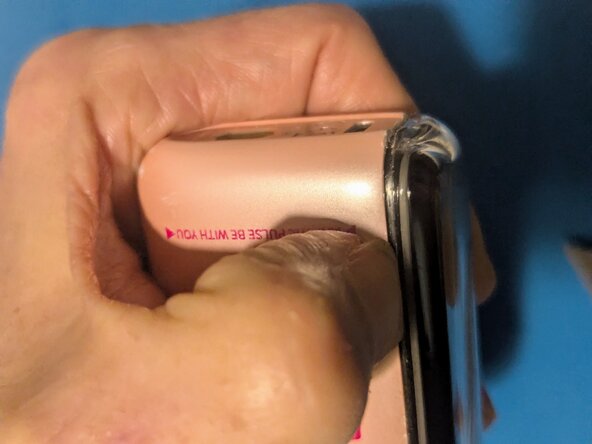
    • Position your thumbnail on the seam near the bottom of the vape.

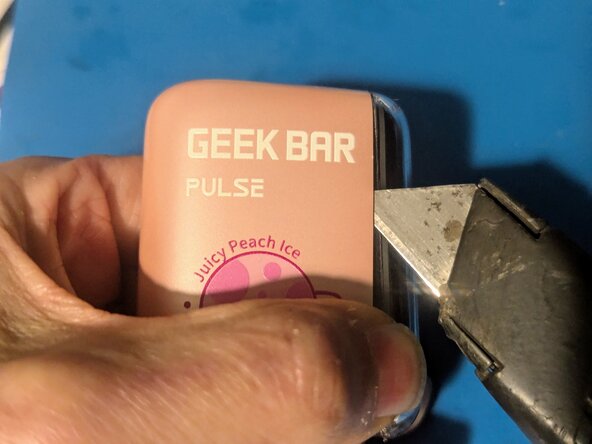
    • Work your utility knife into the two high points of the case on the bottom.

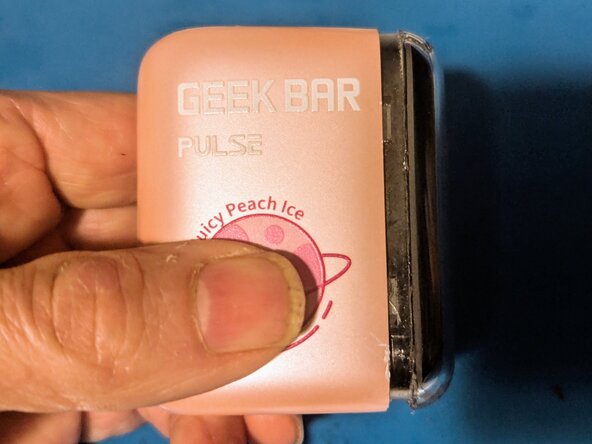
    • Pry the near side of the case far enough open to get your fingernail into the gap to keep it open.

  7. Geek Bar Pulse Mesh Coil Rebuild: step 7, image 1 of 3 Geek Bar Pulse Mesh Coil Rebuild: step 7, image 2 of 3 Geek Bar Pulse Mesh Coil Rebuild: step 7, image 3 of 3
    • Insert your knife and slide it down, then use it to lever the top of the vape out of the case.

    • Using the knife, go back to the bottom and lever the opposite side out.

    • On the other side, insert the knife and use it to pop the clips on that side.

  8. Geek Bar Pulse Mesh Coil Rebuild, Remove the Cover: step 8, image 1 of 2 Geek Bar Pulse Mesh Coil Rebuild, Remove the Cover: step 8, image 2 of 2
    • The clips should be free all the way around at this point.

    • Pull the vape straight out of the case.

  9. Geek Bar Pulse Mesh Coil Rebuild: step 9, image 1 of 1
    • The cover has been removed.

  10. Geek Bar Pulse Mesh Coil Rebuild, Remove the tank: step 10, image 1 of 2 Geek Bar Pulse Mesh Coil Rebuild, Remove the tank: step 10, image 2 of 2
    • The tank is simply fitted into the body of the Geek Bar Pulse, so removal is just a matter of lifting it out. Grasp the silicone seal at the bottom of the tank and pull up on it.

    • Do not attempt to remove the tank by simply holding the tank and pulling up on it. There's a good chance you'll pull the assembly apart, leaving the bottom seal in place.

  11. Geek Bar Pulse Mesh Coil Rebuild: step 11, image 1 of 1
    • The tank has been removed.

  12. Geek Bar Pulse Mesh Coil Rebuild, Remove the tank cover: step 12, image 1 of 3 Geek Bar Pulse Mesh Coil Rebuild, Remove the tank cover: step 12, image 2 of 3 Geek Bar Pulse Mesh Coil Rebuild, Remove the tank cover: step 12, image 3 of 3
    • Using a blunt object small enough to fit through the top hole (in this case the bottom end of an X-Acto knife), push the foam out of the cover.

    • Again, attempting to pull the assembly out by the bottom seal will result in the whole thing self-destructing.

    • Continue pushing on the pad until it's free of the cover.

  13. Geek Bar Pulse Mesh Coil Rebuild: step 13, image 1 of 1
    • The tank cover has been removed.

  14. Geek Bar Pulse Mesh Coil Rebuild, Remove the absorbent foam: step 14, image 1 of 2 Geek Bar Pulse Mesh Coil Rebuild, Remove the absorbent foam: step 14, image 2 of 2
    • The foam is split along the front side of the tank. To remove it, simply spread it open and take it off.

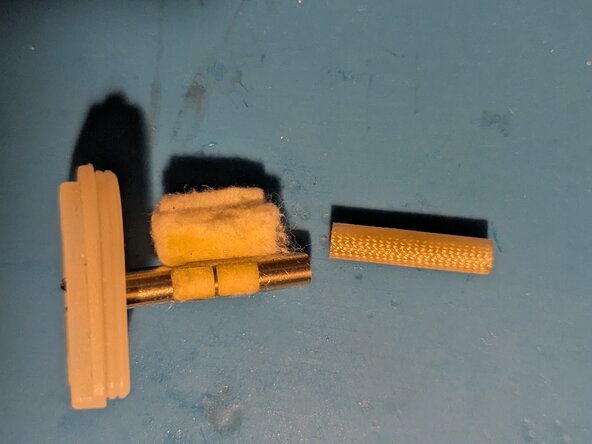
    • Here is the coil assembly separated from the tank foam.

  15. Geek Bar Pulse Mesh Coil Rebuild, Remove the tank seal: step 15, image 1 of 3 Geek Bar Pulse Mesh Coil Rebuild, Remove the tank seal: step 15, image 2 of 3 Geek Bar Pulse Mesh Coil Rebuild, Remove the tank seal: step 15, image 3 of 3
    • At this point the silicone tank seal is held on by the electrical wires, that are bent over into depressions that fit over pins in the base.

    • If you look carefully you can see that the wires are red, green and black. The black wire is the common, the green goes to the bottom coil and the red to the top.

    • Use fine tip tweezers or needle nose pliers to straighten out the wires so they will pass through the opening in the tank seal.

  16. Geek Bar Pulse Mesh Coil Rebuild: step 16, image 1 of 1
    • Once the wires are straightened, the tank seal will simply pull off the coil assembly.

  17. Geek Bar Pulse Mesh Coil Rebuild, Remove the wire retainer: step 17, image 1 of 3 Geek Bar Pulse Mesh Coil Rebuild, Remove the wire retainer: step 17, image 2 of 3 Geek Bar Pulse Mesh Coil Rebuild, Remove the wire retainer: step 17, image 3 of 3
    • In this picture you can see the retainer that holds the wires securely inside the metal tube of the vaporization chamber; it's the black ring visible just inside the opening.

    • It's fitted in there fairly securely, so it may take some significant prying to get it out.

  18. Geek Bar Pulse Mesh Coil Rebuild: step 18, image 1 of 1
    • Note that the end that goes in first is tapered to make it a little easier to insert, so pay attention to the orientation when reassembling the coil tube.

  19. Geek Bar Pulse Mesh Coil Rebuild, Remove the breather tube: step 19, image 1 of 1
    • The breather tube at the other end of the coil assembly pulls out easily.

  20. Geek Bar Pulse Mesh Coil Rebuild, Remove the cotton/coil assembly: step 20, image 1 of 1
    • The top end of the metal tube is slotted for removal and insertion of the cotton+coil set.

  21. Geek Bar Pulse Mesh Coil Rebuild: step 21, image 1 of 3 Geek Bar Pulse Mesh Coil Rebuild: step 21, image 2 of 3 Geek Bar Pulse Mesh Coil Rebuild: step 21, image 3 of 3
    • Grasp the cotton firmly and pull it toward the top of the tube to remove it.

  22. Geek Bar Pulse Mesh Coil Rebuild: step 22, image 1 of 2 Geek Bar Pulse Mesh Coil Rebuild: step 22, image 2 of 2
    • The cotton/coil set is free.

    • Here you can see the condition of this assembly in a vape that is well past it's prime; the cotton is burnt and the coils are covered with carbon.

  23. Geek Bar Pulse Mesh Coil Rebuild, Build a new cotton/coil set: step 23, image 1 of 3 Geek Bar Pulse Mesh Coil Rebuild, Build a new cotton/coil set: step 23, image 2 of 3 Geek Bar Pulse Mesh Coil Rebuild, Build a new cotton/coil set: step 23, image 3 of 3
    • Start with an organic cotton face cleansing pad.

    • Cut it into two 15 X 30 mm rectangles.

    • Stack one on top of the other.

  24. Geek Bar Pulse Mesh Coil Rebuild: step 24, image 1 of 3 Geek Bar Pulse Mesh Coil Rebuild: step 24, image 2 of 3 Geek Bar Pulse Mesh Coil Rebuild: step 24, image 3 of 3
    • Lay the replacement coil down on the cotton with the two wires closest to you, centered on the cotton pad.

    • (Optional) In order to reduce the time needed for your ejuice to soak the cotton, squirt a line of juice over the area covered by the mesh.

    • For this step you'll need a solid dowel of some sort to wrap the assembly around. This forms the coil and leaves an airspace in the center of the assembly. The shaft should be somewhere between 2 and 3 mm in diameter; in this case I used an iFixit Standoff Screwdriver, which measures at 2.5 mm.

    • If you use a dowel that's on the small side, double check to ensure that the two edges of the mesh do not touch when they're wrapped around it. If they do, the mesh won't heat, as the resistance will be wrong.

    • Wrap the cotton tightly around the shaft and hold it in place.

  25. Geek Bar Pulse Mesh Coil Rebuild, Insert the coil/cotton into the metal tube: step 25, image 1 of 3 Geek Bar Pulse Mesh Coil Rebuild, Insert the coil/cotton into the metal tube: step 25, image 2 of 3 Geek Bar Pulse Mesh Coil Rebuild, Insert the coil/cotton into the metal tube: step 25, image 3 of 3
    • Carefully fit the end of the assembly into the end of the tube with the opening slot.

    • Be sure all three wires feed out the opposite end of the tube.

    • Slide the cotton into the tube; you may have to compress the cotton to get it started.

    • Continue inserting the cotton until it bottoms out firmly at the end of the slot.

    • Make sure there's still cotton visible at the top of the opening on the side; if there's a gap, slide the cotton up slightly to eliminate the gap.

  26. Geek Bar Pulse Mesh Coil Rebuild: step 26, image 1 of 1
    • Slide the shaft back inside the tube to leave space to insert the wire retainer.

  27. Geek Bar Pulse Mesh Coil Rebuild, Bend the wires: step 27, image 1 of 1
    • If you laid the mesh coils down correctly, the two wires should be on the left side as viewed with the cotton facing down, with the common wire on the right. Bend them to the sides in preparation for the wire retainer.

  28. Geek Bar Pulse Mesh Coil Rebuild, Insert the wire retainer: step 28, image 1 of 3 Geek Bar Pulse Mesh Coil Rebuild, Insert the wire retainer: step 28, image 2 of 3 Geek Bar Pulse Mesh Coil Rebuild, Insert the wire retainer: step 28, image 3 of 3
    • Carefully insert the wire retainer into the tube with the tapered end first.

    • It may take some amount of force to press it in.

    • It should be flush with the end of the tube when it's inserted fully.

  29. Geek Bar Pulse Mesh Coil Rebuild, Remove the spacer dowel: step 29, image 1 of 1
    • With the wires secure, it is now safe to remove the tool you're using as a spacer.

    • Straighten the wires back out so the tank seal will fit over them.

  30. Geek Bar Pulse Mesh Coil Rebuild, Fit the bottom seal in place: step 30, image 1 of 1
    • Slide the tank seal over the wires and fit it onto the tube. The rounded end faces the same direction as the cotton pad.

  31. Geek Bar Pulse Mesh Coil Rebuild, Bend and trim the wires: step 31, image 1 of 3 Geek Bar Pulse Mesh Coil Rebuild, Bend and trim the wires: step 31, image 2 of 3 Geek Bar Pulse Mesh Coil Rebuild, Bend and trim the wires: step 31, image 3 of 3
    • Bend the wires so they cross the holes in the base where the electrical contacts fit.

    • The red lines indicate the outer edge of the contact island where the wires should be trimmed.

    • Trim the three wires

  32. Geek Bar Pulse Mesh Coil Rebuild, Mark the wires for stripping: step 32, image 1 of 2 Geek Bar Pulse Mesh Coil Rebuild, Mark the wires for stripping: step 32, image 2 of 2
    • Mark the inside edge of the contact island on all three wires.

    • Straighten the wires so the bottom seal can be removed.

  33. Geek Bar Pulse Mesh Coil Rebuild, Remove the tank seal: step 33, image 1 of 1
    • Slide the tank seal off to make stripping the wires easier.

  34. Geek Bar Pulse Mesh Coil Rebuild, Strip the wires: step 34, image 1 of 1
    • Use wire strippers to strip the ends of all three wires at the point you marked them.

    • I strongly suggest a pair of clamping hemostats to hold the bottom of the wire as you strip it to keep from pulling it out of the tube, thus ruining the mesh coils.

  35. Geek Bar Pulse Mesh Coil Rebuild, Bend the wires: step 35, image 1 of 2 Geek Bar Pulse Mesh Coil Rebuild, Bend the wires: step 35, image 2 of 2
    • Replace the bottom seal onto the tube.

    • Once more, bend the wires over the contact holes; black (common) to the single hole, and the individual coil contacts (blue in this case) to the double holes.

  36. Geek Bar Pulse Mesh Coil Rebuild: step 36, image 1 of 2 Geek Bar Pulse Mesh Coil Rebuild: step 36, image 2 of 2
    • Using tweezers or small needle nose pliers, bend the bared ends of the wires down into the contact holes. The wires should extend straight down along the edges of the holes.

  37. Geek Bar Pulse Mesh Coil Rebuild, (Optional) Soak the cotton with ejuice: step 37, image 1 of 1
    • If you want to be able to use the vape immediately after reassembling it, now is a good time to load the cotton with juice. Soak the cotton well with your favorite liquid and it'll be ready to go as soon as you put it back together. Otherwise you'll need to give it time for the ejuice to be absorbed by the cotton after filling.

  38. Geek Bar Pulse Mesh Coil Rebuild, Reinsert the breather tube: step 38, image 1 of 2 Geek Bar Pulse Mesh Coil Rebuild, Reinsert the breather tube: step 38, image 2 of 2
    • Squeeze the end of the breather tube slightly to fit it into the metal tube and slide it down until it sits securely against the cotton.

  39. Geek Bar Pulse Mesh Coil Rebuild, Replace the foam pad: step 39, image 1 of 2 Geek Bar Pulse Mesh Coil Rebuild, Replace the foam pad: step 39, image 2 of 2
    • Spread open the foam pad and wrap it around the coil assembly.

    • Check to ensure the breather tube is flush with the top of the foam. If not press it down further into the cotton until it is.

    • If the foam is melted or burnt at the location of the coils, flip the foam end for end and you'll be able to use a fresh section of foam there.

  40. Geek Bar Pulse Mesh Coil Rebuild, Install the tank cover: step 40, image 1 of 2 Geek Bar Pulse Mesh Coil Rebuild, Install the tank cover: step 40, image 2 of 2
    • Slide the tank cover over the foam until the bottom seal is seated.

  41. Geek Bar Pulse Mesh Coil Rebuild, (Optional) Verify the coil resistance: step 41, image 1 of 2 Geek Bar Pulse Mesh Coil Rebuild, (Optional) Verify the coil resistance: step 41, image 2 of 2
    • Insert the probes of your ohmmeter between the common wire and each of the two coil wires. They should both read approximately 1.2 ohms. This will verify the coils are properly in place and not shorted.

Conclusion

To continue reassembly, follow these instructions in reverse order from Step 10 to the beginning. But before you do, now is the perfect time to refill your Geek Bar Pulse tank.

Jerry Wheeler

Member since: 03/21/22

92,190 Reputation

84 Guides authored

0 Guide Comments

Add Comment

View Statistics:

Past 24 Hours: 6

Past 7 Days: 71

Past 30 Days: 242

All Time: 696