
Free Shipping on Domestic Orders $75+

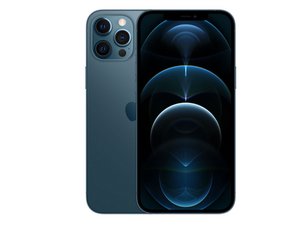
Apple's top-of-the-line smartphone for 2020. Announced on October 13th and released November 13th, the iPhone 12 Pro Max sports a 6.7" OLED display, a triple rear camera system with LiDAR, and 5G connectivity. Successor to the iPhone 11 Pro Max.

Face id not working/possible fix?

Hi,

I’ve recently encountered an issue with Face ID, specifically with the TrueDepth/dot projector, which has caused Face ID to become disabled.

I’ve already tried the common troubleshooting steps, such as restarting the phone, updating iOS, resetting Face ID, etc., but it appears to be a hardware-related issue.

Is there any way to replace the faulty projector with a new or donor part? I understand that the Face ID components are paired to the phone, so I was wondering whether a programmer such as a JCID could be used to copy the original serial/pairing data and write it to a donor part from another phone.

Would that be enough to restore Face ID, or does this type of repair require transferring components from the original module using microsoldering?

Thanks in advance!

Answer this question I have this problem too

Is this a good question?

Score 0
Add a comment

2 Answers

This would be a microsoldering job. The pairing is done via hardware and I've never been successful at tricking the software.

Was this answer helpful?

Score 0
Add a comment

Starting with the iPhone 12 series, Apple has relented somewhat with their parts pairing, allowing you to replace components that were previously not easy to replace due to pairing issues. As of iOS 18 and later, there is a new utility, the Repair Assistant, that runs when a part has been replaced. The caveat here is that you can, of course, only use genuine Apple parts, but they can be either new or used, as long as the used part doesn't come from a phone that's been reported lost or stolen.

I can't answer this definitively, but I've seen at least one report that the Repair Assistant will work with Face ID components, which would be a boon to us if that's true. So you should be able to go on the Apple self service parts site and purchase your new front camera assembly, in which case it's a pretty safe bet that it'll fix your Face ID issue, or you can look on places like eBay for used parts that will also work, as long as it's a genuine Apple part.

Was this answer helpful?

Score 0

4 Comments:

Thank you for all the help, quick question, which part should I swap out, the front camera module or the earpiece module?

by

@ompos The TrueDepth camera and the dot projector are both part of the front camera assembly, so if that's where you've determined the trouble is, that's the assembly you'll need to replace. Here's the iFixit part, which of course won't help, but at least you'll know what you're looking for.

iPhone 12 Pro Max Front Camera Assembly

by

That's the thing, I'm unsure what part is faulty here. When running the diagnostics mode and testing face id, the "Presence Check" passed while the "Face ID Sensor Check" failed, with the message "The TrueDepth camera has an issue that's affecting Face ID". Also in settings under the Repair Assistant the Face ID is listed as issue and therefore has disabled even turning it on. Is there any conclusion to draw on what part is needed to replace and if not, are there any other tests I can run/try? Also I've tested the proximity sensor in a call and it works, if that has any relevance.

by

@ompos I'm close to the limit of my expertise here, but let me tag a couple of folks who might be able to help.

@flannelist, @tomchai, any suggestions here?

by

Add a comment

Add your answer

ompos will be eternally grateful.
View Statistics:

Past 24 Hours: 12

Past 7 Days: 73

Past 30 Days: 73

All Time: 73