
Free Shipping on Domestic Orders $75+

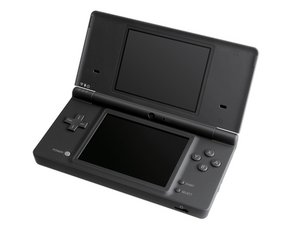
The Nintendo DSi is the third iteration in the Nintendo DS line, and made its debut in Japan in late 2008.

My DSi only works while charging.

Tried playing a game on it a while ago, and when the charger is plugged in it works perfectly fine. When it isn't, it discharges very quickly (not immediately, but definitely in less than a minute). I haven't opened it up yet, because I don't really know what to look for and how to know for sure if the battery is the problem.

What could the issue be + what do I look for to see if that's the case with my DSi in particular?

Answered! View the answer I have this problem too

Is this a good question?

Score 0
Add a comment

1 Answer

Chosen Solution

Sounds like a battery issue. The DSi is now 17 years old, and even the best batteries would have deteriorated after such a long period of time. Swapping the battery is pretty easy on the DSi, compared to modern devices that features glued down batteries. All you have to do is locate the really obvious battery door on the bottom of the DSi, turn a few screws, and you would have access to the battery, which simply pops out like the one in Nokia phones.
Here's the guide for it:Nintendo DSi battery replacement
There might be corrosion caused by a leaked battery, though, if the battery had remained untouched since you first bought it. In that case wear gloves and remove the battery ASAP. Then use cotton swabs dipped in isopropyl alcohol to throughly clean the whole area. If the issue still persists, you might also consider taking it apart and replace the power board, as there is usually rust on the contacts if the battery has indeed leaked, causing batteries to drain fast. Here's the guide for it:Nintendo DSi power board replacement.
If a new battery and power board didn't solve it, then the issue might be motherboard related, caused by corrosion on somewhere else other than the power board. That is the worst case scenario, and it makes the whole repair much more complicated. Take the motherboard out entirely with this guide:Nintendo DSi motherboard replacement, inspect for signs of corrosion(white stains, sticky stuff, anything out of ordinary), and gently brush that area with a toothbrush dipped in isopropyl alcohol. Hopefully that will get rid of the corrosion. If not, you might consider getting a new motherboard, since repairing the old one would require delicate micro soldering.
But again, it might just be a defective battery.
Get yourself a new battery first and me know if this solved your problem!

Nintendo DSi Battery Image

Guide

Nintendo DSi Battery Replacement

Difficulty:

Easy

2 minutes

Nintendo DSi Power Board Image

Guide

Nintendo DSi Power Board Replacement

Difficulty:

Moderate

Nintendo DSi Motherboard Image

Guide

Nintendo DSi Motherboard Replacement

Difficulty:

Moderate

Was this answer helpful?

Score 1

2 Comments:

Hi!

Doesn't seem to be a leak of any kind, and I nearly ordered a new battery but when I removed the current one to take a look and put it back in, suddenly I didn't have this problem anymore! I suppose sometimes things work out that way.

Thank you for answering though, I suspect something will go wrong eventually and I'll have to come back and refer to this haha

by

Yeah, that's pretty common with Nintendo consoles. They often fix themselves. I guess the problem could be either loose contacts, corrosion of some kind, or a number of other mysterious things. Anyway, I'm glad you fixed it!

by

Add a comment

Add your answer

melonyellow will be eternally grateful.
View Statistics:

Past 24 Hours: 0

Past 7 Days: 8

Past 30 Days: 59

All Time: 300