Student-Contributed Wiki
An awesome team of students from our education program made this wiki.
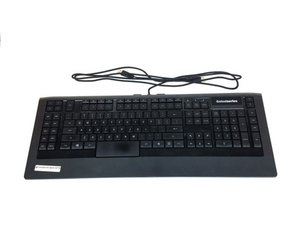
This troubleshooting page will help you diagnose problems with the SteelSeries Apex 64145.
The Keys Are Not Responding
Some or all of the keys are unresponsive when pressed.
Faulty USB Port
Switch to another USB port on your computer when connecting the keyboard. There is a possibility that the port on the computer could be broken or is not properly recognizing the device. In case it is broken, check out this replacement guide SteelSeries Apex 64145 USB Port Connector Replacement
Bad Driver
If the computer is not detecting the keyboard as soon as it is plugged in, try to install the updated version of the driver or a working older version from SteelSeries' website using this link.
Broken Keys
If the keys have been physically damaged (cracks, scratches, shifted placement), refer to out replacement guide on how to replace broken keys. SteelSeries Apex 64145 Key Replacement
LED Lights Are Not On
No lights appear on the keyboard when plugged in.
LED is Burned Out
You will have to purchase new LED lights and perform replacement. Refer to our guide on how to replace burnt LED's, and which type of LED to purchase. SteelSeries Apex 64145 LED Replacement
Keyboard Feels Shaky and Unbalanced
Rubber stands are missing or damaged.
Current Stands Are Too Worn/Damaged
Replace the current worn out stands with the provided stands contained in the keyboard box. Refer to our guide on how to replace the stands. SteelSeries Apex 64145 Rubber Stand Replacement
One of My Keys is Stuck
Keys do not go back to their original position after being pressed.
The Key is Dirty
Carefully pry the key in an upward direction until it pops out, then thoroughly wash the key with water at room temperature. Let the key dry, then gently push the key back into position on the keyboard.
Keyboard is Not Recognized on My Computer
The keyboard doesn’t appear among devices in the computer or doesn’t show up in the SteelSeries Engine.
Plugged Into the Wrong USB Port
The keyboard could be plugged into a type of USB port that is having trouble recognizing it. For instance, if the keyboard is currently plugged into a USB 2.0 port, try plugging it into a USB 3.0 port. Make sure that both of the USB plugs on the keyboard are plugged into the same type of USB port.
Bad Driver or Missing Driver
Make sure that the current driver is up to date and properly installed on your computer. Go to SteelSeries' website for directions on how to download their software using this link.

Team

USF Tampa, Team S1-G1, Nance Spring 2017 Member of USF Tampa, Team S1-G1, Nance Spring 2017
USFT-NANCE-S17S1G1
4 Members
60 Guides authored

4 Comments
PART-1
The problem I am having is that a few keys are not triggering anymore
the keys are as follows:
(the period key, greater-than key, question mark key, right shift key & finally the quotation mark key) I might have to get the plastic circuit sheets to replace the ones I have. because it seems that part of the plastic circuit sheets might be damaged some how. I was playing a video game and then poof out of no where all the lights on the keyboard went out and keyboard stopped responding
I unplugged the keyboard and even tested it on another computer and it didnt want to go back on
so i opened the keyboard to check if something burnt out, I cleaned everything with rubbing alcohol and let it dry. put everything back together and boom keyboard started to function only to have the keys mentioned above not working I re-opened the keyboard several times to make sure nothing was pinching anything.
Twsted - Reply Share
PART-2
i even tested it by just pressing the circuit allocated connections from the 3 plastic circuits sheets under the membrain sheet within the within the keyboard and it would not type those keys out,
but it does it for all the other keys. So im sure the plastic circuit sheets are damaged for some odd reason hoping that if I call or email Steelseries, that I can purchased a new set of circuit sheets from them.
This is my favorite keyboard as I do LOVE chiclets keyboards
I wish Steelseries would make a newer version of this APEX-350 without taking away ANY of the sets of keys or layout it already has , but rather improve on it. and have every key lit up individually colored - I can only wish
If Steelseries could make a Chiclet `mechanical` keyboard that would be insane :)
like a APEX-350 MARK-II mechanical keyboard, I would be first in line to buy it.
Twsted - Reply Share
I have a problem so I left on holiday 3 weeks ago my keyboard apex pro tkl 2023 wireless was fine but when I came home it would not work at all . The plugs are in everything is in but won’t work at all. The led wouldn’t turn on , it doesn’t even show the menu pad . Won’t show anything when I’m charging it either . Can somebody help ?
Geek - Reply Share
some of my keys f9-f12 light up orange and my keyboard just stops working
Kayston Phillips - Reply Share