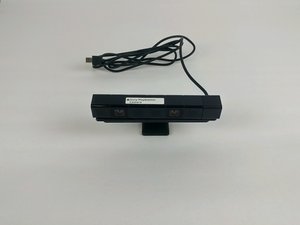
Student-Contributed Wiki
An awesome team of students from our education program made this wiki.
Audio Input Not Detected
The console does not respond to voice navigation commands.
Sony PlayStation Camera Not Fully Plugged In
Ensure camera's connector is fully seated into the correct port on the console.
Microphone Array Connector Loose
If camera is plugged in and video works, but the audio is inoperative, the microphone array connector may not be fully seated to the motherboard. Ensure connector is fully seated by following this guide through step 10.
Faulty Microphone Array
If camera is plugged in and the video works, but audio input is still inoperative after checking the array connector, the microphone array is faulty. Replace the microphone array using this guide.
No Video Output
The console does not show video output for video chat.
Sony PlayStation Camera Not Fully Plugged In
Ensure camera's connector is fully seated into the correct port on the console.
Camera's View Obstructed
Check the area around the camera to ensure its view is unobstructed into the area you want to be seen by the camera.
Faulty Camera
If the camera is plugged in and audio works, but video output is not produced with an unobstructed view, one, or both of internal cameras are faulty. Since the cameras are affixed to the motherboard with an epoxy, replace the motherboard using this guide.
Camera Not Tracking Movement Accurately
Video output is produced, but tracking of players does not work for controlling games.
Background Does Not Contrast Enough With User
The background setting's contrast should be a consistent color tone and needs to differ sharply from the user, for proper movement tracking. Ensure the background setting in the camera's field of view maintains a sharp contrast to the user's clothing color tone and skin's color tone.
Camera's Motherboard Is Faulty
If camera produces video for video chat, but does not track movement, or lags, after checking on the background contrast, then the camera's motherboard is malfunctioning. Replace using this guide.

Team

USF Tampa, Team 5-5, Passmore Spring 2017 Member of USF Tampa, Team 5-5, Passmore Spring 2017
USFT-PASSMORE-S17S5G5
3 Members
24 Guides authored

20 Comments
Okay so my camera I've had it about a year and it looks exactly how I bought it no wires are sticking out either so my camera works perfectly and so does my mic but today my mic it just stopped working like it worked earlier but now it just doesn't but it doesnt show any sigh that it's broken… and my cameras perfectly fine ….got any idea of what's wrong with it?
-katia
Katia - Reply Share
Same problem for me too
mrjackson88real - Reply Share
I also just had this problem happen. Audio stopped working mid game and no longer works.
Kevin - Reply Share
Quick follow up, I got mine to start working again after doing a hard shut down and restart, rather than going into “rest mode”.
Kevin - Reply Share
My ps4 camera is not even turning on
Michael - Reply Share