Student-Contributed Wiki
An awesome team of students from our education program made this wiki.
Device Won't Connect to WiFi
The device has weak wireless connection or no connection.
Weak Router Signal
First, ensure the internet router is working properly. If the router has a weak signal, reset the router or simply power off the router and turn it back on. If the connection still has a weak signal after reset, contact the ISP (Internet Service Provider) for further assistance.
WiFi Interference
Weak signal or bad connection can be caused by interference such as walls or magnetic devices. Make sure the device is not in an area with thick walls that will cause a weak Wifi signal. If the device is in an area with interference, try moving the device to another location closer to the WiFi router.
Bad WiFi Adapter
If the device is powered on and the router is not functioning properly, try to connect to a wired Ethernet network using a cat6 or cat6e Ethernet cable. If the device works properly with the Ethernet cable connection, check the connection to the wireless adapter. If problems continue, the communications board may be damaged and may need to be replaced.
Bad Ethernet Connection
The device will not connect via Ethernet cable.
Bad Ethernet Cable
If the device loses connection while being plugged into the Ethernet port, do the following. First, unplug the cord and plug the cord back into the port after ten seconds have passed. Then, check if the device receives a better connection. If the problem continues, check if the status light turns on when the Ethernet cord is plugged into the port which indicates that the device is receiving a connection. If the problem continues, the current Ethernet cord may be damaged. Try replacing the Ethernet cord and see if the problem persists.
Device Won't Power On
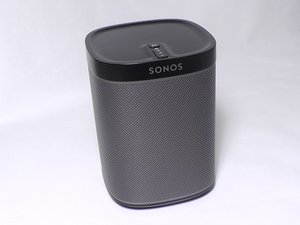
Sonos Play: 1 will not turn on.
Faulty Power Adapter
Check to make sure the power adapter is plugged in. If the adapter is properly plugged in, the power button on the device will light up. If the light does not turn on, then the power adapter may be damaged. A new power adapter may be necessary.
Faulty Power Button
If the device does not turn on after the power adapter is replaced, check to make sure the device power button is working. The power button has a light that will light up when the button is held down indicating the the device has powered on. If the light is not coming on, consider replacing the power/volume switch board. There is a link to the guide that demonstrates how to do this below.
Replacing Sonos Play 1 Power and Volume switch board.
Bad Audio Output
Either the device is not audible or the speakers are not functioning. The audio quality is bad, noisy or contains static.
Bad Motherboard
It's unlikely that both speakers would be damaged at the same time, but it's worthwhile to eliminate this as the source of the problem. If the device is not emitting sound out of either speaker, make sure it's properly plugged in. To make sure that it has nothing to do with wireless connection, connect the device to a wired network using an Ethernet cable. If neither speaker emits sound, check to make sure all the connections with the motherboard and the speaker are correctly connected. If everything is properly connected, its likely that the motherboard must be replaced. There is a link to the guide that demonstrates how to do this below.
Sonos Play 1 Motherboard Replacement
Bad Lower Mid-range Speaker
If the audio emitted from the device is only high pitched without any low bass or treble, try cycling the power on the device. If the problem continues, check to make sure the lower mid-range speaker is properly connected to the motherboard. If the connections are firm, the lower mid-range speaker may be damaged. Before replacing this speaker, use an amp meter to test the speaker to make sure it's receiving input from the motherboard (the current should be fluctuating). To do this, connect the positive and negative terminals of the amp meter to the speaker's positive and negative wires. If the amp meter reading fluctuates and the mid range speaker still does not function, the speaker is bad. There is a link to the guide that demonstrates how to do this below. If the amp meter reading does not fluctuate during the test, then it is possible that the motherboard is damaged.
Sonos Play 1 Mid-Woofer speaker Replacement
Bad Tweeter
If the audio emitted from the device is lacking high pitched frequencies, shut off the device and power it back on. If the problem continues, check to make sure the upper tweeter is properly connected to the motherboard. If it's properly connected and the lower mid-range speaker is functioning properly it is most likely that the upper tweeter speaker needs to be replaced. Before doing so the use an Amp meter to test the speaker to make sure it's receiving input from the motherboard. To do this, connect the positive and negative terminals of the amp meter to the speakers positive and negative connection wires. If the amp meter reading fluctuates and the mid range speaker still does not function, the speaker is bad and needs to be replaced. There is a link to the guide that demonstrates how to do this below. If the amp meter reading does not fluctuate during the test then it is possible that the motherboard is to blame.
Sonos Play 1 Tweeter Speaker Replacement
Device Doesn't Detect Sonos Speaker
iPhone won't detect the Sonos Play:1 speaker.
Bad IP address
Check to make sure that the IP address that shows up on the device matches the IP address from the Sonos Play:1 speaker. If the IP address is not the same, proceed with the following steps. First, power all devices off which should include the Sonos Speaker, router, and device (phone, tablet, or computer). Once all devices have been shut off, power on the router then the Sonos speaker. Once devices have completely powered on, turn on the device and proceed with the Sonos Play:1 set up guide. Repeat steps if problem continues.

Team

USF Tampa, Team 8-4, Eyestone Fall 2015 Member of USF Tampa, Team 8-4, Eyestone Fall 2015
USFT-EYESTONE-F15S8G4
4 Members
84 Guides authored

6 Comments
I have som components that needs a replace and i know that on off the components are a fuse but i need one ore two more components that i dont know what is. Can anyone help me whit specs on the components so i can buy them. See picture of the motherbord of my Sonos Play 1.
Thomas Hansen - Reply Share
I dropped my play 1 and now I have white pulsing light, what is broken?
A Siersema - Reply Share
I reset my play one speaker and have flashing green light but no sound, help please. Also this came with the house I purchased. How do I set it up with my email address? Thanks Mike
mcmiller@zebra.net
mike miller - Reply Share
Followed all the steps to reset Sonos play 1 but final step tells me to wait for solid white light but my light continues to flash green
mmonties20 - Reply Share
Sonos not found even after I use Ethernet cable. Followed steps to the last which said wait for solid white light but mine continues to flash green
mmonties20 - Reply Share