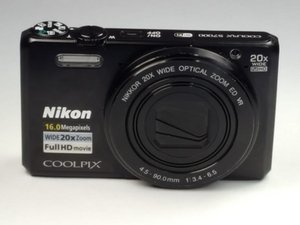
Student-Contributed Wiki
An awesome team of students from our education program made this wiki.
Camera Will Not Power On
The camera is not responsive, and does not seem like it is powering on at all.
Faulty Battery
Make sure your battery is fully charged. One of the most common underlying causes of unresponsiveness is a dead battery. If you are unsure that your battery is charged, plug in your power adapter and let the camera charge for 2 hours. If the camera still doesn’t turn on, you may need to replace the battery. Check out this guide to do so: Battery Replacement.
Sticky Power Button
A sticky power button may be the cause of the camera not turning on. If the camera remains unresponsive even after replacing the battery, you may need to replace the power button. Check out this guide to do so: Sticky Button.
Camera Turns On, but the Screen Does Not
When the camera powers on, the screen does not display anything.
Faulty LCD Screen
Make sure that the light for the power button is on. If nothing is being displayed on the LCD screen, then the screen could be at fault. You can replace the LCD screen by following this guide: LCD Replacement.
Buttons Stopped Working
The buttons are not working when pressed, are sticky, or are missing altogether.
Button Jammed
If the button otherwise works normally but has become stuck and cannot return to its original state, you can follow this guide to fix it: Sticky Button.
Missing Buttons
Make sure the camera is turned on and the buttons are not jammed. If the buttons are still unresponsive, or missing altogether, the buttons may need to be replaced. You can follow this guide for button replacement: Button Replacement.
Camera Produces Blurry or Obstructed Images
When a picture is taken, the photo comes out all black, overexposed, or different than expected.
Faulty Camera Shutter
If your camera will only take all black pictures, or overexposed ones, a possible cause could be that your camera's shutter feature is stuck. To check, turn off flash and automatic settings and take a picture. If the camera does not flicker, the shutter may be stuck. To resolve this, follow our repair guide: Sticky Button.

Team

USF Tampa, Team S2-G3, Lacy Spring 2017 Member of USF Tampa, Team S2-G3, Lacy Spring 2017
USFT-LACY-S17S2G3
4 Members
60 Guides authored

11 Comments
When trying to recharge the battery's, it starts alright, but shortly after the OffON goes on and 'battery exsausted'. (Using the original cabel). Camera serial# 41003207. Purchased 3years ago in a Media Mark store.
Katalin AL reda - Reply Share
@katalin
I had the same problem and I just replaced the baterry, all good now
armando weber - Reply Share
#41003207, from Media Marks, using original recharger Cabel, on with computer, shortly after charging starts, the ON/OFF and ' battery exsaustet' turns on, and closes. What to do.?
Katalin AL reda - Reply Share
pictures are not clear, i get pictures blur after shot, i don't what happened to this camera
i haven't used it much, so disappointed with this purchase
pls help
Divya Yadav - Reply Share
My grandson dropped my s7000 and now the lens will not extend and no picture on screen.
Theresa Browning - Reply Share