Student-Contributed Wiki
An awesome team of students from our education program made this wiki.
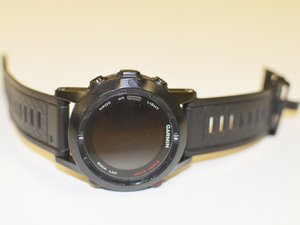
Garmin Fenix not charging (Fixed)
Frozen Screen or Unresponsive to Button Presses
The device performs very slow, freezes up, and does not respond.
Too Many Operations
A frozen device could be caused by the watch performing several tasks at the same time. Before resetting the device, wait a few minutes and try again. If the device is still unresponsive try resetting it.
To perform a master reset: Ensure the watch is powered off. Press and hold the DOWN button. Power on the watch while continuing to hold the DOWN button.
The device will not charge.
Faulty USB Adapter
Check to make sure the USB adapter is plugged in. If it is, make sure the adapter is attached tightly to the back of the device. If the adapter is snug and plugged in, check for and clear any debris on the contact points on the back of the device. After doing all of this and the device still does not power on or charge, consider purchasing a replacement adapter.
Short Battery Life
The battery only lasts for a few hours instead of all day
GPS is constantly updating
To adjust the GPS settings to optimize battery life, go into the GPS settings. To do this hold Menu key > Select Settings >Select Activity> Choose Activity > Select GPS Mode
If activity is around 8 hours, select Normal
If activity is over 8 hours, select UltraTrac, select the appropriate interval time, and finally select Done
Settings are Configured Improperly
To set all the settings back to their default you will perform a master reset. To perform a master reset, ensure the watch is powered off. Press and hold the DOWN button. Power on the watch while continuing to hold the DOWN button.
Faulty Battery
If your Garmin Fenix 2 still has a short battery life you may have to replace the battery.
Screen is Dim
The screen is not dark enough.
Contrast is set too Low
To adjust the contrast and, hold MENU, and select Settings > General > Display. Next select Contrast, press up to darken the display or down lighten it.

Team

IUPUI, Team 54-4, Wilson Spring 2016 Member of IUPUI, Team 54-4, Wilson Spring 2016
IUPUI-WILSON-S16S54G4
3 Members
60 Guides authored

13 Comments
Hi,
I connected a Fenix2 to the charger while was wet! It immediately turned off and doesn't turn on at all. What should I do now?
Hanif Khodaverdi - Reply Share
Hi, All!
I have a question.
Can I replace LCD display on my Fenix2 with LCD display from Fenix 1-gen. ? I think that LCD from Fenix 1-gen. shold be same with Fenix2 Special Edition. Or I wrong?
Waiting for your reply.
Alexandr - Reply Share
My Fenix 2 watch immediately shuts off as soon as I unplug it from the charger even when the battery is fully charged… Please help.
GabrielL - Reply Share
I had exactly this issue. It happened when I unplugged my Fenix 2 from a USB charger that supports 1A or 2A - it’s selectable. I tried charging the watch using my PC USB port and now it’s charged and working fine without the charging cable.
jookieapc - Reply Share
My Fenix2 screen goes blank and the watch restarts whenever I try to start recording an activity. Any suggestions?
Thanks
RP
Ralph Pampino - Reply Share