Introduction
Is your iRobot Roomba i7, not charging when connected to the Home Base? Is your device not turning on? In order to fix this problem, you must remove and replace the battery in your device. This guide will help you replace the battery on your iRobot Roomba i7.
The battery for the iRobot Roomba i7 is located in the the center of the device, directly in front of the iRobot Roomba i7 dual roller rubber brush system. The function of the battery is to store, and provide electricity to the entire device. The average run time of the iRobot Roomba i7 is 1 hour and 15 minutes.
Before you begin using this guide, make sure that your Roomba is turned off, and disconnected from the charging station, or Home Base.
Warning: Swollen or cracked batteries can be hazardous to humans due to fumes or potential fire. If you feel unsafe at anytime completing this guide, put your device in a fireproof container and take it to a replacement professional.
What you need
-
-
-
Flip the iRobot Roomba i7 so that the underside is facing upwards.
-
Using a Phillips #1 screwdriver, loosen the following screws:
-
6.27mm-screw in the center of the side brush.
-
Five 6.24mm-screws on the bottom cover.
 Ask FixBot
-
-
-
Carefully remove the bottom cover.
-
If the cover is stuck or hard to remove, use a prying tool to separate it from the device.
-
-
-
-
Close the Roomba app on your mobile.
-
Remove the battery from your Roomba.
-
Hold the start button for 10 seconds.
-
Reinstall the battery and charge for a full cycle. Wait for your Roomba to automatically start itself.
-
Open the mobile app and reconnect to your Roomba.
-
-


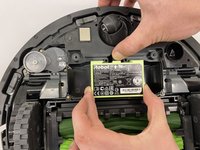
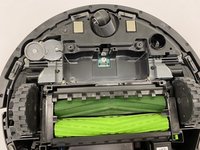
To reassemble your device, follow these instructions in reverse order.
Battery Disposal: Never dispose of old batteries in the trash. For proper disposal, take it to your local battery recycling facility. You can find one by doing a quick internet search for "battery recycling facility" and including your zip/postal code or city name in the search. Also, check out http://call2recycle.org and plug in your zip/postal code. This will show you all of the registered drop-off locations near you.
Cancel: I did not complete this guide.
5 other people completed this guide.

Team

Embry-Riddle Aeronautical University, Team S14-G5, Lamothe Spring 2020 Member of Embry-Riddle Aeronautical University, Team S14-G5, Lamothe Spring 2020
ERAU-LAMOTHE-S20S14G5
4 Members
60 Guides authored
5 Guide Comments
Its a shame the battery is so small compared to the cavity. The run time could be greatly expanded by simply putting in a larger battery.
iFixit sells a larger battery that fills the cavity. My i7 used to take 2 charge cycles to clean the main floor of the house. Now it can do it in a single charge. iRobot Roomba i7 Battery Replacement
I bought this battery a bit ago and it would never charge :(
My j7+ says it cannot detect the battery. I have had alot of battery issues where the robot just dies where its at or doesnt charge at the base unless rebooted. Any ideas?
What is charging error 19
