Free Shipping on Domestic Orders $75+

Scuf Instinct Pro Batteries Replacement

Views: 2.2K

View statistics:

Past 24 Hours:
1
Past 7 Days:
18
Past 30 Days:
81
All Time:
2,199
Comments: 0

No one has left comments on this guide. Will you be first?

Go to guide comments
Completed: 0

No one has marked this guide "completed." Will you be the first?

Favorites: 0

No one has favorited (and subscribed to) this guide. Will you be the first?

Time Required: 1 - 2 minutes
Difficulty: Very easy
Scuf Instinct Pro Batteries Replacement

Introduction

Go to step 1 ↓

Follow this guide to replace the batteries in your Scuf Instinct Pro Xbox controller.

The Scuf Instinct Pro controller uses two AA batteries, but it's compatible with the Xbox Play and Charge rechargeable battery.

What you need

    1. Scuf Instinct Pro Batteries Replacement, Prepare your controller for disassembly: step 1, image 1 of 1
      • Unplug all cables from your controller before starting.

      • Completely power off your controller.

      Ask FixBot

      Add Comment

    1. Scuf Instinct Pro Batteries Replacement, Remove the battery cover: step 2, image 1 of 2 Scuf Instinct Pro Batteries Replacement, Remove the battery cover: step 2, image 2 of 2
      • Weak magnets and two clips along the bottom edge secure the battery cover to the controller.

      • Slide the battery cover away from the controller to remove it.

      Ask FixBot

      Add Comment

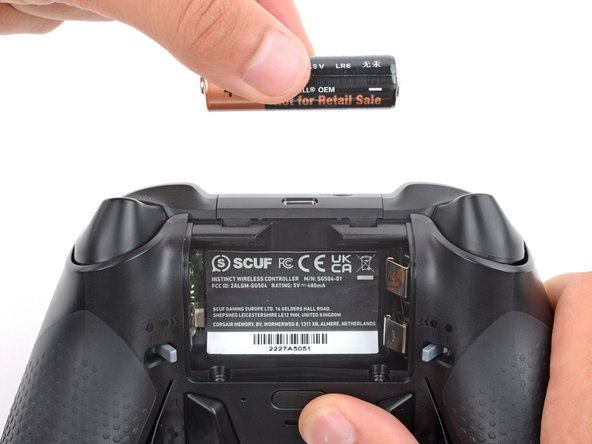
    1. Scuf Instinct Pro Batteries Replacement, Remove the batteries: step 3, image 1 of 3 Scuf Instinct Pro Batteries Replacement, Remove the batteries: step 3, image 2 of 3 Scuf Instinct Pro Batteries Replacement, Remove the batteries: step 3, image 3 of 3
      • If your batteries are starting to corrode, clean the contacts and replace the batteries.

      • Use your fingers to remove the batteries.

      • During reassembly, insert the batteries so their positive (+) and negative (–) ends match up with the markings on the battery contacts.

      Ask FixBot

      Add Comment

Conclusion

To reassemble your device, follow these instructions in reverse order.

Take your e-waste to an R2 or e-Stewards certified recycler.

Cancel: I did not complete this guide.

Spencer Day

Member since: 09/14/22

207,547 Reputation

1,266 Guides authored

Team

iFixit Member of iFixit

Staff

121 Members

72,931 Guides authored

0 Guide Comments

Add Comment

View Statistics:

Past 24 Hours: 1

Past 7 Days: 18

Past 30 Days: 81

All Time: 2,199