
RIDGID R84015 X2 Speed Switch Replacement

Evan Long and 6 other contributors
Last updated on Feb 19, 2016
Views: 4.3K
View statistics:
- Past 24 Hours:
- 3
- Past 7 Days:
- 25
- Past 30 Days:
- 87
- All Time:
- 4,298
Comments: 0
No one has left comments on this guide. Will you be first?
Go to guide commentsCompleted: 2 3
2 people have marked this guide "completed." Will you be next?
3 people have marked this guide "completed." Including you — great job!
Favorites: 4 5
4 people have favorited (and subscribed to) this guide. Will you be next?
5 people have favorited (and subscribed to) this guide — including you!
Missing Prerequisites
This guide is missing information on how to start the process. Make a prerequisite guide!
Introduction
Go to step 1 ↓The speed (1-2) Switch is either stuck or won't change speed of rotation.
What you need
Tools

-
-
-
Remove the backplate.
-
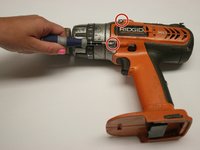
Using a Torx T20 screwdriver, remove the four screws attaching the back plate.
 Ask FixBot
-
-
-
Remove the drill handle.
-
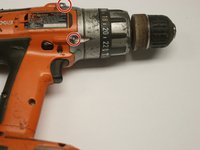
Using the Phillips #2 screwdriver, remove the five screws attaching the drill handle to the body.
-
-
-
-
Remove the gear casing from the body.
-
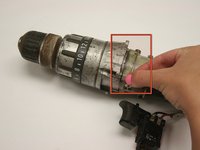
Using the Philips #2 screwdriver, remove the four screws attaching the gear casing to the body.
-
-
-
-
-
Locate small metal bar above plastic part of drill.
-
Attempt to move bar back and forth. If it wont move, try to move it while rotating the chuck. If it still will not move, there is a problem with the gears. For help see the Planetary Gear Replacement Guide
-
-
-
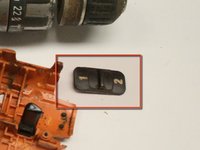
If the bar moves, next check the small plastic switch that is numbered 1 and 2.
-
Make sure the small tabs on the underside of the switch that move the bar are intact.
-
Replace switch as needed.
-
-




To reassemble your device, follow these instructions in reverse order.
Cancel: I did not complete this guide.
2 other people completed this guide.

Team

Cal Poly, Team 15-48, Garner Spring 2010 Member of Cal Poly, Team 15-48, Garner Spring 2010
CPSU-GARNER-S10S15G48
6 Members
60 Guides authored
