
Nintendo 3DS Battery Replacement

David Hodson and 9 other contributors
Last updated on Aug 11, 2026
Views: 150K
View statistics:
- Past 24 Hours:
- 88
- Past 7 Days:
- 513
- Past 30 Days:
- 2,608
- All Time:
- 149,783
Comments: 42
33 comments on steps, 9 guide comments.
Go to guide commentsCompleted: 73 74
73 people have marked this guide "completed." Will you be next?
74 people have marked this guide "completed." Including you — great job!
Favorites: 21 22
21 people have favorited (and subscribed to) this guide. Will you be next?
22 people have favorited (and subscribed to) this guide — including you!
Featured Guide
This guide has been found to be exceptionally cool by the iFixit staff.
Introduction
Go to step 1 ↓Remove the battery in your Nintendo 3DS to replace it with a new one.
What you need
Parts

Tools


-
-
Tool used on this step:Phillips #00 Screwdriver$5.49
-
Use a Phillips PH00 screwdriver to loosen the four screws along the top of the back cover.
 Ask FixBot
-
-
-
Grab the top edge of the back cover with your opposite hand so that the cover does not fall back into place.
-
Pull the back cover up and away from the rest of the device to remove it.
-
-
-
-
-
-
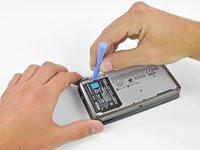
Insert a plastic opening tool into the notch in the lower case above the battery.
-
Pry the battery up with the plastic opening tool.
-
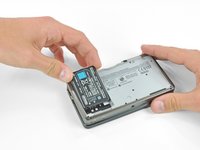
Grab the top edge of the battery and lift it out of the lower case.
-
-



To reassemble your device, follow these instructions in reverse order.
Cancel: I did not complete this guide.
73 other people completed this guide.

9 Guide Comments
Easy as pie. Thanks for writing this guide!
I want to buy a battery to replace the old one, do you have any stablishment in An Salvador where I can buy it?
https://store.nintendo.com/battery-pack-... Here it is for the 3ds and 2ds battery pack from Nintendo.
