
Motorola Moto 360 LCD Display Replacement

Cole Twitchell and 2 other contributors
Last updated on Jun 18, 2015
Views: 23K
View statistics:
- Past 24 Hours:
- 4
- Past 7 Days:
- 26
- Past 30 Days:
- 112
- All Time:
- 22,859
Comments: 44
37 comments on steps, 7 guide comments.
Go to guide commentsCompleted: 15 16
15 people have marked this guide "completed." Will you be next?
16 people have marked this guide "completed." Including you — great job!
Favorites: 7 8
7 people have favorited (and subscribed to) this guide. Will you be next?
8 people have favorited (and subscribed to) this guide — including you!
Introduction
Go to step 1 ↓The entirety of the Moto 360 is very fragile. Take extreme caution when using tools.
What you need
Tools
-
iOpener Kit4.8
-


-
-
-
Set the watch face down on a flat surface.
-
Place the heated iOpener on the face of the rear cover to loosen the adhesive underneath.
 Ask FixBot
-
-
-
Follow the instructions here to remove the back cover without force by using some needles in the right places:
-
Then continue with step 5. Or don't use needles and just continue with the next steps.
-
-
-
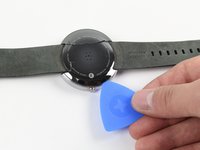
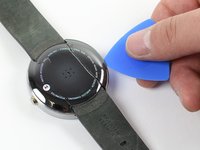
Gently slide the blue opening pick between the rear cover and the metal casing.
-
Work your way entirely around the rear cover.
-
-
-
Once the adhesive has been successfully loosened, gently pull the rear cover off.
-
-
-
-
-
-
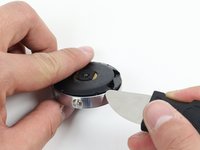
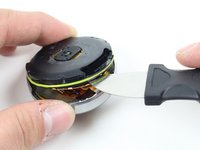
To get to the O-Ring, use the Jimmy to gently pry off the rear housing.
-
-
-
-
-
Set the Moto 360 face up on a flat surface.
-
Place the iOpener on the face of the device screen.
-
-
-
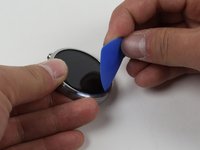
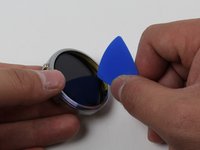
Gently slide the opening pick between the screen and the metal casing.
-
Work your way around the face of the screen, loosening the adhesive.
-
-
-
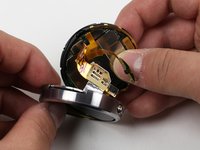
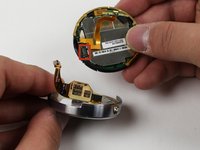
Detach the copper ribbon connecting the motherboard to the display.
-
For reassembly, attach copper ribbon where it is marked.
-
-









To reassemble your device, follow these instructions in reverse order.
Cancel: I did not complete this guide.
15 other people completed this guide.

Team

Cal Poly, Team 17-32, Amido Winter 2015 Member of Cal Poly, Team 17-32, Amido Winter 2015
CPSU-AMIDO-W15S17G32
4 Members
60 Guides authored
7 Guide Comments
Good morning,
It is possible to replace the display unit for the Moto 360 2nd with 1.56" display?
Thanks in advance and best regards,
Stephan
Were could i buy a new lcd screen for the moto 360 1st gen??
hey mate you can buy one from aliexpress aliexpress moto 360 screen see link below
Where can I get a LCD display for a Moto 360 2 gen 42mm. Thanks hope you can help
