
Maquet Servo-U O2 Supply Replacement

Cassandra Aarrestad and one other contributor
Last updated on Jul 2, 2020
Views: 3.2K
View statistics:
- Past 24 Hours:
- 5
- Past 7 Days:
- 15
- Past 30 Days:
- 102
- All Time:
- 3,232
Comments: 0
No one has left comments on this guide. Will you be first?
Go to guide commentsCompleted: 0 1
No one has marked this guide "completed." Will you be the first?
1 person has marked this guide "completed." It's you — great job!
Favorites: 0 1
No one has favorited (and subscribed to) this guide. Will you be the first?
1 person has favorited (and subscribed to) this guide — and that's you!
Introduction
Go to step 1 ↓If the measured O2 concentration is below the set value by more than 5 vol.% or concentration is below 18 vol.% which is independent of settings; gas delivered in O2 supply line is not O2; O2 sensor faulty or exhausted; O2 cell uncalibrated; gas module for O2 faulty. Regularly check the cell status in quick menu SYSTEM STATUS/O2 cell. The O2 cell should be exchanged if <10% estimated remaining capacity is indicated.
The oxygen supply is crucial because O2 is added to the air that is used to provide mechanical ventilation. Most patients need a higher concentration of oxygen than is present in normal atmospheric air.
WARNING! The sealed unit of the O2 cell contains a caustic liquid which may cause severe burns to the skin and eyes. In case of contact, immediately wash the affected area continuously with water for at least 15 minutes and seek medical attention, especially if the eyes are affected.
Before you start, unpack the O2 cell at least 15 minutes before replacement. Turn the ventilator system off using the on/off switch on the patient unit. Make sure to disconnect the ventilator system from the power and gas supply.
-
-
-
Turn the inspiratory channel lock one quarter of a turn to release.
-
Lift off the inspiratory channel cover.
 Ask FixBot
-
-
-
Disconnect the O2 cell connector.
-
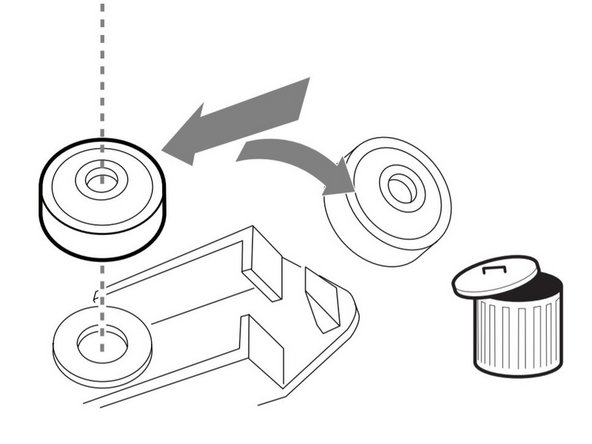
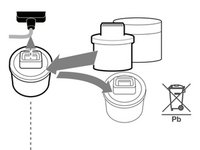
Lift and discard the O2 cell with the rubber seal to special waste and/or remove and discard the bacterial filter to hazardous waste.
-
-
-
Ensure that the new rubber seal is intact, then firmly put in a new bacterial filter.
-
-
-
-
Connect the O2 cell connector.
-
Put the O2 cell in position.
-
Close the locking catch.
-
-
-
Put the inspiratory channel cover in position.
-
Tighten the inspiratory channel lock.
-
Perform a pre-use check stated in Troubleshooting Page.
-
-




Team

Cal Poly, Team S7-G2, Paton Spring 2020 Member of Cal Poly, Team S7-G2, Paton Spring 2020
CPSU-PATON-S20S7G2
3 Members
60 Guides authored
