
Liquid Damage Technique

Derek Myers and 5 other contributors
Last updated on Jul 31, 2019
Views: 8K
View statistics:
- Past 24 Hours:
- 5
- Past 7 Days:
- 25
- Past 30 Days:
- 105
- All Time:
- 7,979
Comments: 1
1 guide comment.
Go to guide commentsCompleted: 1 2
1 person has marked this guide "completed." Will you be next?
2 people have marked this guide "completed." Including you — great job!
Favorites: 5 6
5 people have favorited (and subscribed to) this guide. Will you be next?
6 people have favorited (and subscribed to) this guide — including you!
Action Shots
Be an action hero! This guide needs images that better demonstrate how to perform specific actions.
Incorrect Tools
Help make this guide better by using the correct tools in images and/or text.
Missing Prerequisites
This guide is missing information on how to start the process. Make a prerequisite guide!
Introduction
Go to step 1 ↓In this guide we will go over repairing the WAP54g when there is water damage. If something is spilled or you realize that there is liquid inside the device it is recommended to turn it off and unplug it as soon as possible. This guide is an attempt to fix the router if all else fails.
What you need
Tools
-
High Content Rubbing Alcohol$12.99
-
-


-
-
-
Remove the antennas from the back of the device. To do this, follow steps 1 and 2 of Installing the Antennas Guide: Linksys WAP54g Antennas Replacement
-
-
-
Remove the two black rubber feet of the device using the screwdriver. The feet are located on the bottom towards the front.
-
-
-
Once the feet are removed, two small screws will be visible. With a small screwdriver, unscrew them. Screws are phillips head, 4.35 mm in diameter, 7.88 mm in length.
-
-
-
To remove the front blue panel, grip firmly and place thumbs in the two notches on top. Push thumbs forward while keeping a firm grip on bottom.
-
-
-
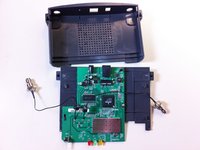
Now slide the bottom panel forward and remove it so the top casing is isolated from the bottom casing and motherboard.
-
-
-
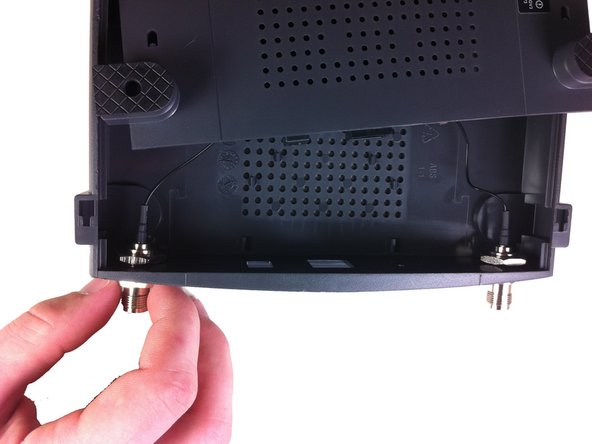
Unscrew the nut on the outer side of the back casing. Remove the nut and the washer from both antenna mounts.
-
-
-
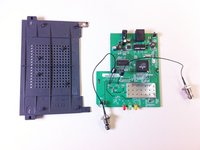
From here, remove the wires and nuts connected to the back panel by pulling the nuts through the holes.
-
Now the top casing has been removed and isolated from the rest of the device. From here, you can make repairs to the top casing.
-
-
-
-
-
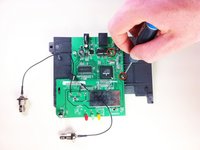
Unscrew the two screws that connect the motherboard to the bottom casing.
-
-
-
-
-
If the spilled substance is dry use a cleaning tool such as a toothbrush with soft bristles, so you do not damage the device, to brush off as much of the foreign material as possible.
-
-
-
Dry off circuit board with kitchen paper; using other types of paper products such as toilet paper will fall apart. Be sure not to rub but carefully apply pressure to dry up wet spots.
-
-
-
Clean off the components to make sure the rest of the residue comes off by using a chemical gasoline or another solvent that contains one substance that evaporates quickly.
-
-

 Ask FixBot








After the device is cleaned and put back together it should work properly.
Cancel: I did not complete this guide.
One other person completed this guide.

Team

Cal Poly, Team 21-21, Maness Fall 2011 Member of Cal Poly, Team 21-21, Maness Fall 2011
CPSU-MANESS-F11S21G21
5 Members
72 Guides authored
