Free Shipping on Domestic Orders $75+

JBL Flip 3 Protective Cover Removal

What you need

  1. JBL Flip 3 Protective Cover Removal, Release the first protective cover: step 1, image 1 of 2 JBL Flip 3 Protective Cover Removal, Release the first protective cover: step 1, image 2 of 2
    • Pry up the cover at the two raised sections on the sides.

    Ask FixBot

    Add Comment

  2. JBL Flip 3 Protective Cover Removal: step 2, image 1 of 2 JBL Flip 3 Protective Cover Removal: step 2, image 2 of 2
    • Pry up the cover on the other side at the raised sections as well.

    • Be careful not to damage the fragile buttons.

    Ask FixBot

    Add Comment

  3. JBL Flip 3 Protective Cover Removal, Remove the first protective cover: step 3, image 1 of 2 JBL Flip 3 Protective Cover Removal, Remove the first protective cover: step 3, image 2 of 2
    • Pull the covers slightly apart and release them.

    • Do not pull them apart too far, or they could break.

    Ask FixBot

    Add Comment

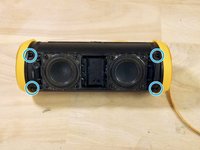
  4. JBL Flip 3 Protective Cover Removal, Release the second protective cover: step 4, image 1 of 3 JBL Flip 3 Protective Cover Removal, Release the second protective cover: step 4, image 2 of 3 JBL Flip 3 Protective Cover Removal, Release the second protective cover: step 4, image 3 of 3
    • Remove the four screws around the edge.

    • The screws are hard to lose, but if they come out, set them aside.

    Ask FixBot

    Add Comment

  5. JBL Flip 3 Protective Cover Removal, Remove the second protective cover: step 5, image 1 of 1
    • Remove the second protective cover.

    Ask FixBot

    Add Comment

Conclusion

Work through the steps in reverse order to reassemble your device.

Cancel: I did not complete this guide.

6 other people completed this guide.

Special thanks to these translators:

de en

100%

These translators are helping us fix the world! Want to contribute?
Start translating ›

Lasse.gra

Member since: 12/19/17

791 Reputation

4 Guides authored

3 Guide Comments

What’s your problem?

Ali - Reply Share

Uncomplete and Sketchy!

How come is this a battery replacement guide? It is only up to the removal of the second protective layer. Many questions remain: How to locate the battery? How to unplug it? How to remove it? How to plug the new one? How to reassamble? …

Yusuf - Reply Share

For the full battery replacement, use JBL Flip 3 Battery Replacement.

Sandra Hiller - Reply Share

Add Comment

View Statistics:

Past 24 Hours: 2

Past 7 Days: 26

Past 30 Days: 97

All Time: 5,661