Introduction
This repair guide was authored by the iFixit staff and hasn’t been endorsed by Google. Learn more about our repair guides here.
Use this guide to replace the outer screen in your Google Pixel 10 Pro Fold.
What you need
-
-
-
Unplug all cables from your phone and completely power it down.
 Ask FixBot
-
-
-
-
-
Apply a suction cup to the screen, as close to the center of the bottom edge as possible.
-
Pull up on the suction cup with strong, steady force to create a gap between the screen and the frame.
-
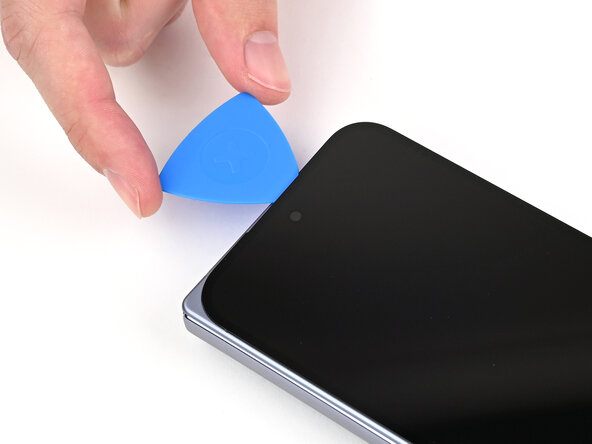
Insert an opening pick into the gap.
-
-
-
Slide the opening pick around the bottom right corner and up the right edge of the screen to separate the adhesive.
-
-
-
Slide the pick around the top right corner and along the top edge of the screen.
-
-
-
Slide your pick down the left edge and around the bottom left corner to separate the remaining adhesive.
-
-
-
Lift the left edge of the screen and swing it over the right edge of the phone, like opening a book.
-
Prop up the screen with your suction handle or a clean, sturdy object.
-
-
Tool used on this step:FixMat$36.95
-
Use a Torx Plus 3IP driver to remove the three screws securing the display cable bracket:
-
One 1.8 mm‑long screw
-
Two 2.5 mm‑long screws
-
-
-
Use the point of a spudger to pry up the display bracket and release its clip from the bottom edge of the frame.
-
Remove the display bracket.
-
-
-
Use the point of a spudger to pry up the display cable press connector.
-
-
-
-
-
-
Congratulations on completing disassembly! The remaining steps will show you how to reassemble your device.
-
-
-
-
-
Use a spudger, or your fingers, to remove the old outer screen adhesive on the frame.
-
Use isopropyl alcohol (>90%) and a coffee filter or a microfiber cloth to remove any adhesive residue.
-
If your new outer screen has a liner covering the front camera cutout, remove it now.
-
-
-
Before removing any liners, check if the outer screen adhesive matches the frame.
-
-
-
Peel away the top half of the new adhesive strip from its clear liner and keep the liner folded before continuing.
-
-
-
Align the top half of the adhesive over the frame, using the corners as reference points.
-
Place the adhesive on the frame.
-
-
-
Use the flat end of a spudger, or your fingers, to press down the top edge of the adhesive and adhere it to the frame.
-
-
-
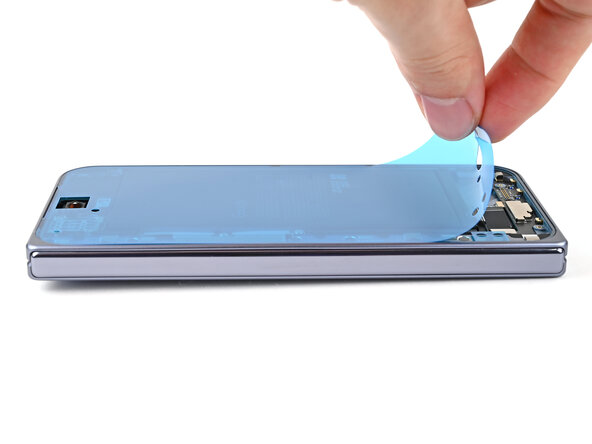
While peeling away the rest of the clear liner, slowly lay the adhesive over the perimeter of the phone.
-
-
-
Use the flat end of a spudger, or your fingers, to press down the rest of the adhesive and adhere it to the frame.
-
-
-
Use the point of a spudger to pry up the segmented tab on the bottom edge of the large blue liner.
-
-
-
Lift the tab and peel off the large blue liner to expose the secondary liner.
-
-
-
-
-
Support the screen with your hand or prop it up on something sturdy.
-
Reconnect the outer screen cable press connector.
-
-
-
Place the display bracket over its spot on the frame.
-
-
-
Use the point of a spudger to press down the display bracket and slide its clip under the bottom edge of the frame.
-
-
-
Use a Torx Plus 3IP driver to install the three screws securing the display cable bracket:
-
One 1.8 mm‑long screw
-
Two 2.5 mm‑long screws
-
If your new outer screen comes with pre-installed adhesive, remove the liner to expose its adhesive and skip here.
-
-
-
Use tweezers to grip the pull tab of the secondary liner at the bottom left corner of the phone.
-
-
-
While holding the screen over the frame, peel the liner from the right and bottom edge of the frame and expose the adhesive.
-
-
-
Align the outer screen over the frame and press it into place.
-
-
-
Press along the perimeter of the outer screen to adhere it to the frame.
-
Let the phone sit a few hours for the adhesive to cure.
-
-






Congratulations on completing your repair!
Take your e-waste to an R2 or e-Stewards certified recycler.
Repair didn’t go as planned? Try some basic troubleshooting, or ask our Google Pixel 10 Pro Fold Answers Community for help.

