
DualShock 3 Battery Replacement

Marcus Aiken and 3 other contributors
Last updated on Jul 26, 2024
Views: 7K
View statistics:
- Past 24 Hours:
- 11
- Past 7 Days:
- 66
- Past 30 Days:
- 319
- All Time:
- 7,028
Comments: 0
No one has left comments on this guide. Will you be first?
Go to guide commentsCompleted: 5 6
5 people have marked this guide "completed." Will you be next?
6 people have marked this guide "completed." Including you — great job!
Favorites: 3 4
3 people have favorited (and subscribed to) this guide. Will you be next?
4 people have favorited (and subscribed to) this guide — including you!
Community-Contributed Guide
An awesome member of our community made this guide. It was not created by iFixit staff.
What you need
Tools

-
-
-
This is the Dualshock 3 controller
-
On the back of the controller, there will be five 7.2mm Phillips screws securing the body of the controller. (The five screws are circled in black.)
-
Remove each of the five screws from the back of the DualShock controller.
 Ask FixBot
-
-
-
Push the center of the rear cover (between the two analog sticks) and carefully lift the lower edge away from the rest of the controller.
-
-
-
Push the rear cover slightly toward the top edge of the controller to clear the front edge of the #2 triggers.
-
Pull the rear cover away from the rest of the controller, but be careful so that you won't pop off the #2 triggers.
-
-
-
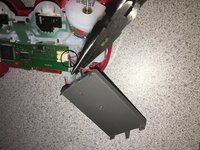
Move the battery off the motherboard so you have enough clearance to access the battery connector.
-
-
-
Tool used on this step:Tweezers$4.99
-
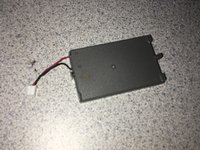
Carefully pull the battery connector away from the socket that is attached to the motherboard. ( Battery connector is circled in black.)
-
-


To reassemble your device, follow these instructions in reverse order.
Cancel: I did not complete this guide.
5 other people completed this guide.

