Introduction
In this guide we will show you how to safely replace the battery in your Corsair K65 Plus Wireless.
Check the troubleshooting guide first to confirm that your battery needs to be replaced.
Before starting the repair, make sure the device is fully powered off and unplugged from the charger.
What you need
-
-
Flip the keyboard over so the bottom of the keyboard faces up.
-
Use a JIS #1 screwdriver to remove the eight 6.0 mm screws securing the bottom casing.
 Ask FixBot
-
-
-
-
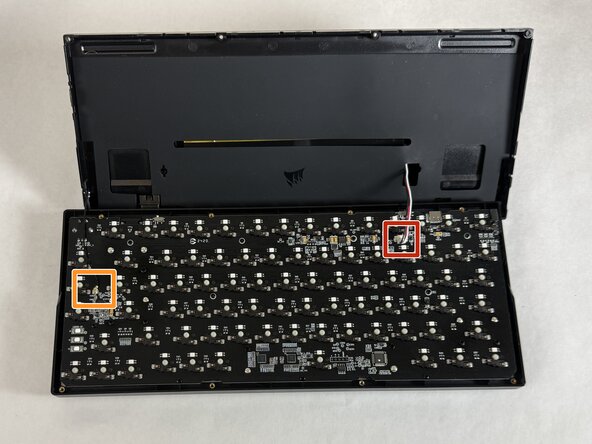
To disconnect the battery cable, use the point of a spudger to push on alternating sides of the connector to "walk" it out of its socket.
-
If that doesn't work, use a pair of tweezers to firmly grip the sides of the connector and pull straight away from the socket. Hold the tweezers closer to the connector to get a better grip.
-
Use tweezers or your fingers to gently disconnect the indicator light cable. Slide a thin, ESD-safe pry tool or angled tweezers under the metal neck of the indicator light cable connector (as close to the head as possible) and lift straight up from the board.
-




To reassemble your device, follow these instructions in reverse order. Take your e-waste to an R2 or e-Stewards certified recycler.

Team

UMass Dartmouth, Team 3-3, Shaddix Spring 2026 Member of UMass Dartmouth, Team 3-3, Shaddix Spring 2026
UMASSD-SHADDIX-S26S3G3
4 Members
5 Guides authored
