

How to fix the black dot
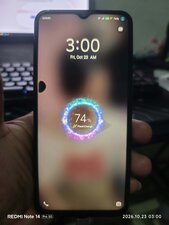
See image content:
Is this a good question?
Score
0
Rep: 103.4k
 163
 90
 160
Marco, I hate to tell you, but that's a failed screen. You can't fix that dot; you'll have to replace the screen. I wasn't able to locate any written, step by step guides like those here on iFixit, but here's a YouTube video that shows you all the steps needed to replace the screen. You'll need a pry tool, a heat source (a hair dryer will do), a small Phillips screwdriver, some 90% or higher concentration isopropyl (rubbing) alcohol, some cotton swabs and glue, something like B7000.
Vivo Y35 Screen Replacement Guide - How to Change Vivo Y35 Display Assembly - YouTube
As you work, take lots of pictures and once you're done you can use them to create your own iFixit guide to that repair. It's easy, fun and will earn the appreciation of the repair community, especially those who come after you with the same problem.
Good luck, and be sure to come back and let us know how it all turns out.
Was this answer helpful?
Past 24 Hours: 1
Past 7 Days: 5
Past 30 Days: 33
All Time: 46

