

Why is my port not working
What I should do to make USB port working?
Is this a good question?
Score
0
What I should do to make USB port working?
Is this a good question?
Rep: 550.3k
 11
11
 425
425
 1.6k
1.6k
Hi @twahayaseen
Plug a mobile phone or a USB mouse into the non working USB port and check if the phone starts to charge of if the mouse's laser lens light turns on.
If it doesn't then check that the USB port’s power has not been turned off.
Go to Device Manager > Universal Serial Bus Controllers > right click on a Root Hub entry > Properties > Power Management and check that the option “Allow the computer to turn off this device to save power” has been unchecked.
To get to Device Manager in Win10/Win11, press the Win key + x key (both keys together) and click on the Device Manager link.
To get to Device manager in earlier Win OS versions, go to Control panel > Device Manager
I don’t know which root hub is associated with the non working USB port, so you will have to check all of them.
Here’s an image from my PC just to show what I mean. It is slightly different as I have a different PC, so different hardware but for the USB Root Hub entries, the principle is the same.
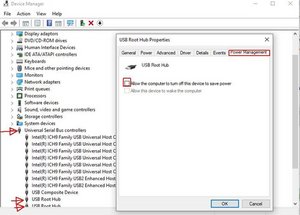
(click on image to enlarge.
Was this answer helpful?
Past 24 Hours: 1
Past 7 Days: 3
Past 30 Days: 20
All Time: 48

