
Free Shipping on Domestic Orders $75+

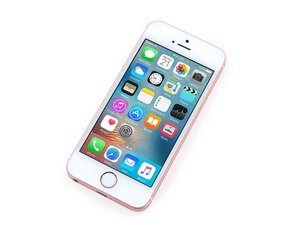
4-inch iPhone released in March 2016 with similar hardware specifications to the 6S. Available in Silver, Space Grey, Gold, or Rose Gold with 16/32/64/128 GB storage options. Model: A1662 and A1723

Why am I having bluetooth problems? Or is it something else?

The bluetooth seems to be working fine on my iphone SE- for music, airdrop, etc. However I'm unable to use my school's door unlocking app (Alta Open) or the Garmin Connect app for my watch. No errors show up, but the doors just don't ever 'see' my phone and the garmin app never 'sees' my watch pop up.

I followed all the troubleshooting that garmin suggests (restarting phone, watch, app, bluetooth) and nothing has changed anything. The watch connects fine to my ipad but, even when i select the device from my account, my phone doesn't 'see' it when they're both in pairing mode.

Is my iphone just too old? Missing some technology spec? Both apps claim to be compatible with my iphone. Any hardware part that could be broken or causing this?

Thanks for reading :)

Answer this question I have this problem too

Is this a good question?

Score 0
Add a comment

1 Answer

Well this is weird bc Bluetooth is supposed to be backwards compatible.

The SE1 supports Bluetooth 4.2 & newer Garmin watches supports 5.0 but it should connect to your phone, although it would be running at 4.2 standards. I'm guessing if music plays, airdrop works, and everything else functions it's probably related to software. Does your Garmin app tell you an older version of the app will be downloaded when you download it from the App Store? Some apps doesn't support older iOSs and would automatically downgrade themselves, so the older version might not be able to work with the new watch. Another possible explanation is that the app itself requires 5.0 to function so it won't work

Same issue with the school gate app, although you might want to make sure that doesn't rely on NFC to function, as the SE1 does support it but can only use it for Apple Pay.

Some things you can try is to look at Software Updates in settings to see if there's an update available and reinstall both apps. If that doesn't work then unfortunately the SE1 might simply be too old for modern tech.

Was this answer helpful?

Score 0
Add a comment

Add your answer

E W will be eternally grateful.
View Statistics:

Past 24 Hours: 1

Past 7 Days: 5

Past 30 Days: 14

All Time: 64