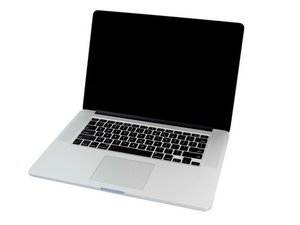

Converting 2013 MacBook Pro to USB trackpad / keyboard
TL;DR - I am attempting to convert a keyboard & trackpad from an early 2013 Macbook Pro retina (a1398) into a standalone usb keyboard & trackpad that can be used with any modern laptop. As someone with minimal soldering and electronics experience, I could use some guidance!
Steps I've taken so far:
- Researched to see if this is even possible -- looks like the answer could be 'yes' based on some examples seen around the web
- Tried to find someone I could hire to do this (no luck thus far... hence why I'm here)
- Recently downloaded the a1398 schematics with the 820-3332-A board and fed it into some chatbots to potentially teach me how to do it myself (schematics link: https://f.ch1p.io/rjHAmTOU/820-3332-a.pd...)
Chatbot Summary of Instructions -> could use help determining if this would work
1. Isolation: Open up the case and remove the R5701 & R5702 resistors -> Ensures the MacBook's PCH doesn't interfere with whatever end computer I connect it with.
2. Data: Solder the Green (D+) and White (D-) wires of the USB cable to the connector side of those R5701 & R5702 resistor pads -> Corresponds to the 'USB_TPAD_P' and 'USB_TPAD_N' connections (Keyboard + trackpad data signals are combined via IPD cable)
3. Power: Solder the Red (5V) wire of the USB cable to the L5700 pad leading to the connector -> this small inductor/ferrite bead provides 5V to the PP5V_S4_TPAD rail via L5700, allowing the trackpad's circuitry to manage internal power needs
4. Ground: Solder the Black wire (GND) to the metal ears or shield of the J5800 connector -> ensures data signals are clean and will be recognized by an external computer
NOTE: In case you're wondering why I'm doing this...
- I have chronic myofascial pain in my upper extremities. This Macbook Pro model allowed me to go for long periods of time without pain. Having tried dozens of newer laptop models for Mac, Windows, and Chromebook, I have yet to find one with a keyboard/trackpad that performed as well for my pain as the MBP a1398. I could really use some help on how to do this myself.
Is this a good question?

 35
35  342
342  977
977 