Free Shipping on Domestic Orders $75+

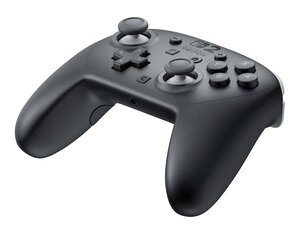
A wireless, more traditional, video game controller produced by Nintendo for the Switch 2 system. Released on June 5th, 2025.

Can the switch pro 2 controller be repaired?

Unlike the original switch pro controller, the switch 2 pro controller doesn't have any apparent screws on its surface. Is it possible to open it to change the battery, or to replace joysticks should they fail?

Answered! View the answer I have this problem too

Is this a good question?

Score 1
2 Comments

This question was migrated from https://www.ifixit.com/Answers.

by

This question was migrated from https://meta.ifixit.com/Answers.

by

Add a comment

1 Answer

Chosen Solution

Hi Miel!

Yes, you can replace the battery and joysticks. But the joysticks are most likely soldered on the motherboard (like the 1st one).

Most likely held by plastic clips first, when removed it should reveal the screws.

Did not received a broken Nintendo Switch Pro 2 controller yet, when I received one, will make some guides :). But this can take some time..

Was this answer helpful?

Score 1

4 Comments:

I found a teardown of the controller on by devJack on StackerNews. They're using a RKJX2 variant from Alps Alpine, which are designed very much like those in the JoyCons, that connect to the board using a ribbon cable.

So they're not soldered and should be "easily" replaceable, and I really stress that easily as it seems you need to remove the faceplate which is held on with plastic clips & adhesive to get to the screws to even take the controller apart. And it assumes the sticks are replaceable with off the shelf standard RKJX2 which has extra plastic near the cable side the variant in the controller doesn't have (hard to tell if this will impede anything from the pictures).

by

That is some great info!! That they are not soldered on means that the repair will be WAY easier. The only thing is that (as predicted) you need to remove the front plate. But again, this will not be that difficult.

by

for some reason, mine keeps going back in forth when i play a game, is that normal?

by

Try to calibrate the joysticks on the Switch. Can't you calibrate it? Then replace the joystick.

by

Add a comment

Add your answer

miel will be eternally grateful.
View Statistics:

Past 24 Hours: 1

Past 7 Days: 19

Past 30 Days: 96

All Time: 96
