Free Shipping on Domestic Orders $75+

Possible to swap storage drive?

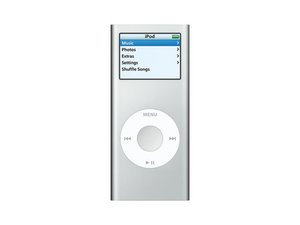
After using it for 20 years and putting weird Rockbox - related stuff on it my iPod nano 2's drive is now completely broken. It became a RAW drive a while ago and now my computer can't even format it. I'd like to swap a new storage chip onto the Nano 2 but I have no idea what kind I should buy and the max storage it would support. Can anyone confirm what kind of chip I should buy and the largest amount of storage it would support? thanks in advance🤓

Answered! View the answer I have this problem too

Is this a good question?

Score 0
Add a comment

3 Answers

Chosen Solution

Hi @leooooooooo

Looking at the image in Step.24 of the ifixit iPod Nano 2nd Generation Teardown the storage is a Samsung 628 flash memory chip that is hard mounted on the logic board.

You might be able to replace it but I wouldn't know if you could even upgrade it or not. If might depend on the firmware that is installed and also other factors e.g. circuit design and components that are already in situ.

Hopefully someone else knows the answer.

Was this answer helpful?

Score 2

2 Comments:

I guess this is kinda niche since no on seemed to have a nano 2 with a broke drive. I'll try to swap it out with a 32G one to see if it'd work. Thanks for the info on the flash!

by

Some new info... apparently you needed to change the position of a lot of resistors on the motherboard to make the storage controller chip to recognize a storage chip with higher storage than the factory one... and there's no iPod nano 2 with more than 16G

I guess I'm stuck with 2Gs then, since there's no info on what resistors I need to change as well

by

Add a comment

Unfortunately, You cannot change out the storage. The storage is built into the mainboard and cannot be replaced.

Was this answer helpful?

Score 0
Add a comment

Yes, swapping the storage drive is possible on most laptops and desktops, as long as the device supports removable storage (HDD or SSD).

Details to Include (if this is for an assignment or support reply)

  • Most desktop computers allow easy replacement of storage drives (HDD or SSD).
  • Many laptops also support swapping storage, especially those with 2.5-inch SATA drives or M.2 SSD slots.
  • Some ultra-thin laptops have storage soldered to the motherboard, which cannot be replaced.
  • Before swapping, you should:
    • Check the device model specifications
    • Confirm the supported storage type (SATA SSD, NVMe SSD, etc.)
    • Backup important data before replacing the drive 💾

If this is for a specific device

Tell me the exact model name (for example: laptop model like HP ProBook 450 G10), and I can confirm whether storage can be swapped and what type of drive it supports.

Was this answer helpful?

Score -1

1 Comment:

...at least check what the AI said before you post it here

by

Add a comment

Add your answer

Leooooo1061 will be eternally grateful.
View Statistics:

Past 24 Hours: 1

Past 7 Days: 13

Past 30 Days: 61

All Time: 94

