
 23
23  10
10  5
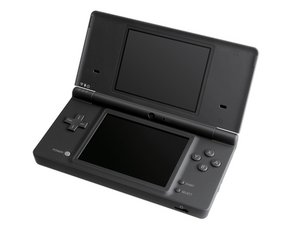
5 DSi not booting and showing error screen
Bought a DSi that looks like it's been smashed by an angry gamer or parent. Both screens are shattered, but there are no signs of fall damage on the casing. When I put the battery in, the console would try to boot, the backlight would come on, it would chime, and then stop halfway and freeze, no matter what I do. I swapped the WiFi card, installed new screens, and tried to boot it on, but it showed the error message screen in Japanese.


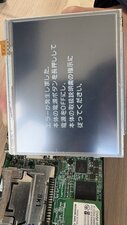
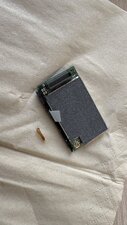
(I removed the cpu shield just to see if any components are dislodged, but there isn't any)
What could be the issue? The motherboard isn't bent, there's no corrosion, the socket for the WiFi card is fine, and it even boots halfway. Could it be that the console is now haunted by the bug that died inside?
Edit:
I don't know how I missed this before, but the casing is bent, and although the motherboard isn't, I'm pretty certain that solder of the CPU or NAND was loose. Planning on doing a reflow now. Does anyone know what temperature I should set my hot air station to?
Is this a good question?


12 Comments
Hi Leo!
Is there a SD card in? Did you tried to booth with holding A and B? Maybe it's modded. You can try with Google Lens to see what the error message is.
by koppie007
Well, the error screens tells me to "turn off the console by pressing the power button" and "refer to the manual", which didn't provide any useful information. I did try the A+B combination and no Unlatch menu popped up, so I assumed it's not modded. Is there any other possible causes for this? maybe the CPU or NAND is loose because of the fall?
by Leooooo1061
Hmm, just a generic error. I would say wifi chip or motherboard indeed. Did you try with a known working wifi chip? Do you have any spare motherboards to test?
by koppie007
yep, both a new wifi board and a working one from my ndsixl. I also made sure that the connector is clean and not misshapen, but both boards showed the same error. When I put the original board back though, it boots halfway and freeze just like before. Is there a region difference or smth that stops wifi chips from being compatible? that's the only plausible explanation I can think of other than a broken motherboard.
by Leooooo1061
No, should not be the case so far I know. This is interesting. I would test with a new motherboard and see what happens with both WIFI chips. It would be the great test. Is this possible for you?
by koppie007
Show 7 more comments