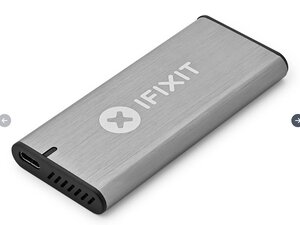

What drives are supported?
What kind of NVMe drives does this support? PCIe Gen 3, 4, and/or5? Or what gen drives can I use? I will use this with a MacBook M4 Pro if that makes a difference.
Is this a good question?
Score
0
Rep: 36
 1
1
What kind of NVMe drives does this support? PCIe Gen 3, 4, and/or5? Or what gen drives can I use? I will use this with a MacBook M4 Pro if that makes a difference.
Is this a good question?
Rep: 103
4
It says PCIe 4.0 on the second image of the shop link you provided, and it's an nvme m.2 with the "size" 2280. What you're looking for is something with this form factor and pins
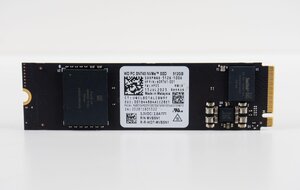
It supports sizes and I quote "2230, 2242, 2260, and 2280mm"
The likelihood of buying older or smaller form factor units is next to 0 in the US and EU, I know because I spent 2 hours shopping for one yesterday.
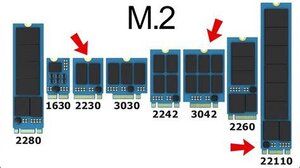
Here's the various sizes of M.2 SSD's:
Was this answer helpful?
I've a similar problem, having purchased a External M.2 SSD NVMe Enclosure for my Samsung 970 EVO Plus with alleged M.2 2280 form factor which IFixIt says is supported. Two problems.
1) It's a tiny bit too long and I can't get it onto the post. When I put it just above the post and slide it into the enclosure, I can read/write but nowhere near the advertised speed. It does not come with a USB-C male-male cable so I bought a J5 USB4 Gen3 cable (alleged 40Gb/s) to connect it to my computer.
2) Performance on two machines is not as advertised (USB 3.1 transfer speeds up to 10GB/s"):
MacBook Air copying back to the computer:
USB-3 connection: 184 MB/s
USB-C connection: 245 MB/s
MacBook Air copying to the drive:
USB-3: 770 MB/s
(not sure I believe this, but the file was about that size and the time was rounded to seconds)
USB-C 367 MB/s
Results with an EliteBook 1040 G10 were slower.
Rep: 502.9k
35
 347
347
 977
977
As for using it with your MacBook Pro M4 system, use disk utility to reformat the M.2 SSD for Mac use using GUID and APFS if you intend to use it exclusively with your or other Mac systems for the best performance and reliability of the SSD it's self.
As far as performance of the case independent of the SSD you use, this case is just a USB-C interface it is not the enhanced versions of USB-C Apple has created supporting ThunderBolt-3 or the very newest ThunderBolt-4 which with the correct M.2 SSD can gain a bit more throughput!
But before you jump, think about this!
Does owning a super fast car in the middle of a dense city offer what the car can do over a simpler economy class car? Clearly not! But then again, driving in the countryside on roads designed to support speed or a race track is the better environment for this speed demon.
So look at your usage needs, most people won't need or gain benefit of the faster case and connection as well as the most high end M.2 SSD's when used in a single bay case like this. These higher end SSD's and interfaces are more beneficial to multi bay enclosures which offer RAID services to push the performance to the wall!
The only exceptions is code compiling, video rendering or building AI LLM processes which all run on the drive when being mobile.
Was this answer helpful?
Past 24 Hours: 0
Past 7 Days: 3
Past 30 Days: 24
All Time: 289

