

Why am I getting this blue screen?
I have a blue screen every time I turn on my laptop says "windows boot manager" and I have to reboot the device many times to open it
Is this a good question?
Score
2
Rep: 37
 2
2
I have a blue screen every time I turn on my laptop says "windows boot manager" and I have to reboot the device many times to open it
Is this a good question?
Rep: 7.8k
5
 6
6
 1
1
Press Windows + R key, input msconfig, and hit "Enter" to open the System Configuration utility.
Verify General and Boot tab look something like these
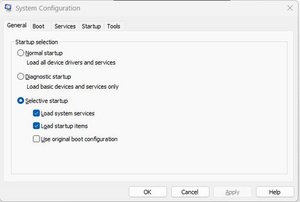
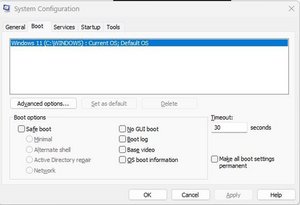
If they do, then there might be an HDD/SSD or CMOS issue.
I would start by booting with a Windows USB thumb drive and doing a repair install.
You can create the thumb drive by downloading a Windows version here
https://www.microsoft.com/software-downl...
Select an option to download and create a USB drive.
Was this answer helpful?
Past 24 Hours: 0
Past 7 Days: 7
Past 30 Days: 22
All Time: 324

