Lexmark B3442dw Paper Jam Front - Error with no Paper
I ordered this printer 3 months ago and Lexmark support has come back to say it's unfixable. But from the first boot up it registers a paper jam (front). No paper has ever been put in the printer. Does anyone have any idea what sensor I should check?
@oldturkey03 I'll have to look at mine and see where the sensors are before I scored a MS621 to replace a temperamental HP. There's a few similar MS variants of it with the same firmware tweak I mentioned on the CS431.
These steps apply to both the "B (3340/3442)" and "MS (331/441)" variants of this printer. The ONLY DIFFERENCE with the MS version is that the firmware is tweaked to use a different toner and will take a larger black toner compared to the "B" variant. It is a binning variation where they use the same parts between the two units, but differentiate them with firnware. You can buy one or the other and get the same unit but cannot interchange toner.
They are so close, they even use the same 40k page drum unit (which is honestly a far cry better, back before these the "entry level drum" was ~20-30k pages, not much better than the common 12k page Brother drum back then)!
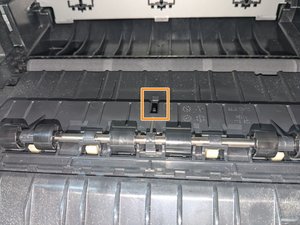
With that out of the way, here's the issue: The sensor inside the toner compartment is probably broken and needs to be replaced, or there is paper under the cover, which can be cleared by taking the two screws marked in red (use a stubby screwdriver unless you want to remove the side panels and top cover -- there is no working room without removing the top panel on this model). Use a small object like a toothpick to see if the sensor moves freely. If it does not, the sensor is broken and needs to be replaced, as it is creating a false jam by being stuck in the closed position too long.
NOTE: Using compressed air inside the sensor may potentially fix it as well, but the way they bury the optical sensors on the newer laser printers makes this less effective and needed. Still may be worth a try as a last-ditch effort.
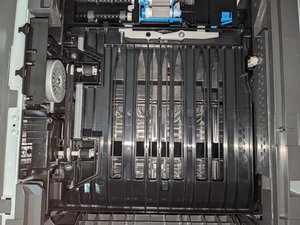
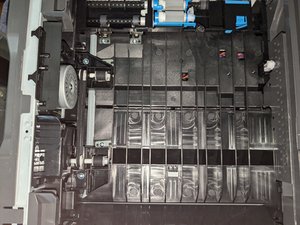
The sensor is towards the bottom of the printer and is a bit tricky to replace AND requires significant disassembly :-(. I have attached photos to show how much of the printer is inaccessible from the bottom with this particular unit:
Scroll through this thread to find the appropriate place for this comment. Then, click "Attach comment to this post" to move it.
4 Comments:
@oldturkey03 this also applies to the MS331/431. It has a firmware tweak to use the MS toner and reject the "B" toner; it uses the same parts as well for the most part (except the controller which may have a different part number).
The "B" variations were pointless IMO, but they were still released. They should have sold them with the MS model number as "GO line" units. It just creates confusion around the toner and serves little to no benefit. Had I known the B3442 was a firmware tweaked MS431, I'd have went for the MS431.
Appreciate it so much. Checked the sensor and it's squeaking when moved and takes a bit of effort to move it. Blew it out anyways with the air gun and nothing so most likely looking at replacing the sensors. Still getting
Paper Jam Front 200 91B as the error message. Can't even clear it off the screen just keeps flaring back to that.
@switchhear Maybe if you can take it out and put something like dry lube on it it'll help? I'd still buy one and expect failure. Wet lube isn't going to be great for a part like this.


 436
436  326
326  167
167 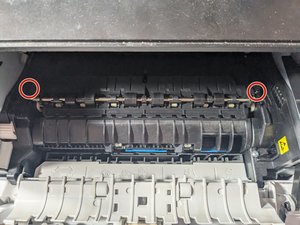

2 Comments
@switchhear let's see if our printer guru @nick has any idea about this.
by oldturkey03
@oldturkey03 I'll have to look at mine and see where the sensors are before I scored a MS621 to replace a temperamental HP. There's a few similar MS variants of it with the same firmware tweak I mentioned on the CS431.
by Nick