

Where is the ssd slot
Cant seem to locate the sad slot on the motherboard
Can't find anything online
Is this a good question?
Score
0
Cant seem to locate the sad slot on the motherboard
Can't find anything online
Is this a good question?
Rep: 99.1k
 155
155
 84
84
 153
153
Hi Kevroll,
Okay, the best source of information is the Hardware Maintenance Manual kindly provided by Lenovo. Here's where you can download a copy.
s130-11igm_s130-14igm_130s-11igm_130s-14...
Page 46 shows how to remove the SSD (I assume that's what you meant rather than "SAD").
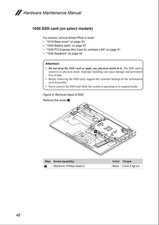
Note that it does say "on select models", so it's entirely possible yours doesn't have a spot for an SSD, but if it does, that's where it will be.
Was this answer helpful?
I did check this and found this diagram. It looks like there's a spot for the ssd right there, it has the keys, but there is no small black bracket to snap the ssd into
@Kevroll By "keys", I'm guessing you mean the solder pads where a connector would be soldered onto the board, is that right?
In theory it should be possible to buy that connector and solder (or have it soldered) it onto the board. Problems are, a) finding the right connector to buy, and b) whether the BIOS supports it on your model.
I hope this will answer your questions.
It also depends on the region your laptop falls in, check on the models below cause there are some which support ssd M 2's and those with NMVe's but the ram its fixed onboard you can not upgrade.
Celeron
N4000 2 2 1.1 GHz 2.6 GHz
4MB LPDDR4 -2133
DDR4-2400
Intel UHD
Celeron Graphics 600
N4100 4 4 1.1 GHz 2.4 GHz
Pentium
Silver
N5000
4 4 1.1 GHz 2.7 GHz Intel UHD
Graphics 605
Storage
Optical
One of the following, configurable by model:
• M.2 SSD / PCIe NVMe, PCIe 2.0 x 2
• M.2 SSD / SATA 6.0Gb/s (e.g. xxxGB SSD M.2)
• 32GB or 64GB eMMC (embedded Multi Media Card) flash memory on board.
Was this answer helpful?
Past 24 Hours: 3
Past 7 Days: 8
Past 30 Days: 34
All Time: 575



1 Comment
Kevroll post a couple of good images of where you are seeing this "looks like there's a spot for the ssd right there, it has the keys, but there is no small black bracket to snap the ssd" That way we can see what you see. Adding images to an existing question
by oldturkey03