Free Shipping on Domestic Orders $75+

The 5th generation of the Moto E Play smartphones, released in July 2018. Model numbers XT1921

Charging port pins damaged?

My phone was only charging when I pushed the charger in as hard as I could. I cleaned out the port with a toothpick, but now it's very finicky. It will only charge in USB mode instead of AC, and it's much too slow even after I replaced the battery. Sometimes I have to twist or push the charger around to get it to connect at all. I think the pins are damaged somehow, but they are as straight and clean as I can get them. Other micro usb ports I've compared it to look much sturdier, but this one has very thin, flimsy pins!

Answer this question I have this problem too

Is this a good question?

Score 0
Add a comment

4 Answers

Most Helpful Answer

I assume you are talking about a micro USB port. I have had issues with some devices. It is very difficult to tweak those pins. You said it works OK with a USB charger vs the AC charger. That would indicat the AC has a separate cable. Therefore it may be a problem with the AC connector and not the phone connector.

Was this answer helpful?

Score 2

2 Comments:

Some good comments here...

All USB charging is done with DC.

Whether its a USB cable in a power bank or a USB cable into an AC adapter.

Asking Bekahoot;

What is the difference between a "USB charger" and a USB "AC charger?

I'm sorry I'm European I don't get the difference.

by

In my thinking an "AC charger" is one that plugs into the mains. A "USB Charger" would be plugged into a std USB port as on a computer.

by

Add a comment

Bekahoot.

We need to establish where exactly the problem is in the power supply chain?

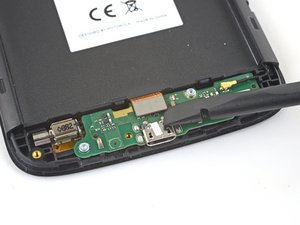
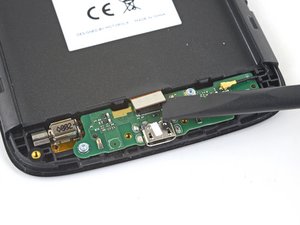
If you follow @craiglloyd Motorola Moto E5 Play Screen Replacement guide from steps 4 as far as step 11.

  • The problem is either going to be the in the USB charge connector OR with the motherboard flex to the so called “daughter board”
Block Image
  • The intermittent / Slow charge could be an intermittent connection (increased contact resistance) on the motherboard flex. Sometimes carefully opening and closing the connection may have a positive result.
Block Image
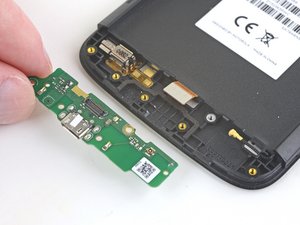
  • The daughter board can be removed from step 11 to step 12 where it can be inspected visually.
Block Image
  • Bear in mind the USB port is an electro/mechanical component subject to repeated use, stresses and strains and can and will wear out eventually.
  • If its questionable it seems like a servicable part I’d replace it

Was this answer helpful?

Score 1
Add a comment

I am as we speak messing with my lovely port ,this ain't my first rodeo guys and gals,its my second. Thankfully it don't seem as bad as the first time I can say though it is not hard to fix. My sons gf changed mine out with another one in like 5 minutes I was amazed(thought that might give someone some hope out there). Seems this time its just the lil tiny pins, if I knew how the pesky lil sh*ts looked normal I might be able to do a quick fix hope I helped keep hope alive

Was this answer helpful?

Score 0

1 Comment:

Compare the pins to a good cable. It is very difficult to reform those pins. Messing them up with too much reform action is easy. Check for bad solder connections if it is on a PCB. I have had that problem with some devices.

by

Add a comment

I bought the Moto e5 play charge port PCB from a store on AliExpress in 2025. Very good and low priced. There are two versions. With or without audio components. Compare your board with the pictures. Very easy to replace. Just be careful and keep track of the screws.

Was this answer helpful?

Score 0
Add a comment

Add your answer

Bekahoot will be eternally grateful.
View Statistics:

Past 24 Hours: 2

Past 7 Days: 12

Past 30 Days: 41

All Time: 1,593