Repair Guides
Learn how to fix just about anything with our step-by-step guides.
App
Your pocket repair helper.
FixBot
The friendly AI repair assistant.
Repairability
Learn why fixable products make sense.
Teardowns
Get a sneak peek inside the latest gadgets.
Answers Forum
Share solutions and get help from a friend.
Find Your Community
Find teams, events, and fellow fixers.
Help Out
Help make repair knowledge free and accessible for everyone.
Right to Repair
Learn about the Right to Repair movement and how to be an advocate.
Featured
Quality parts and tools backed by our lifetime guarantee.
Tools
Shop our wide selection of precision tools.
Parts
Shop parts backed by our quality guarantee.
iPhone Batteries
Batteries tested and guaranteed plus a kit with everything you need.
Free Shipping on Domestic Orders $75+
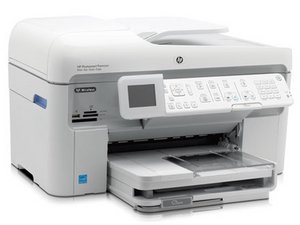
HP Photosmart Premium Wireless All-in-one Color Inkjet Printer/Fax/Copier/Scanner introduced 2009.
Nazia Parveen @naziaparveen
Rep: 1
Posted: Jul 28, 2020
How to re set my printer is does on than it off by self
Is this a good question?
Med_tech @chris_p
Rep: 1k
4
Remove power plug.
Press and hold # and 9, while reconnecting power plug.
Keep holding for 10-15 seconds, then release.
That’s it. You will need add settings again after this.
Was this answer helpful?
Past 24 Hours: 0
Past 7 Days: 2
Past 30 Days: 17
All Time: 211
