
Free Shipping on Domestic Orders $75+

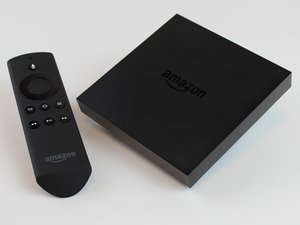
This is the first generation of Amazon Fire TV (model CL1130), released on April 2, 2014. It is a powerful media streaming and gaming device that allows the user to stream digital audio/video content to a high-definition television as well as play video games.

Amazon Fire TV reset - WITH wrong version of remote

Was watching Amazon Fire TV with fireTV stick perfectly fine until it shut off and reset out of nowhere. Fine, whatever -paired it up with my fire stick, did the reset process, logged in, set up wifi again, etc. Then it got to this screen:

Block Image

It plays music asks to toggle the sound with the Fire Remote. This is where it gets tricky, because the remote I have isn’t the one that comes on screen. My remote doesn’t have volume control buttons.

Block Image

Advanced setup just asks what IR setup for my TV I have. Once I answer that, it immediately goes back to this screen. If I try to go back, it takes me back to my login screen. I can’t progress until I toggle the sound with my remote, which I can’t.

This remote has been working perfectly with the TV ever since it was first set up last year and was working fine as well prior to Amazon Fire just randomly resetting. The remote worked (and still does) perfectly with the entire set up process before this mark. I can’t go back, I can’t skip it, the home button won’t work.

Scoured online for this problem and haven’t seen anyone else with this issue. Amazon Fire keeps trying to factory reset for some reason as well. I have no idea how to make it past this and would be baffled if I needed to buy a different remote entirely out of the blue for no reason like this.

Answer this question I have this problem too

Is this a good question?

Score 0
Add a comment

1 Answer

This is usually not a software reset problem any more; it is an input/pairing problem at the first-run screen.

A few things to check before resetting it again:

1. Make sure the remote is actually a Fire TV remote that supports your Fire TV Stick generation. Some older Fire TV / Fire TV Stick remotes look similar but will not pair correctly with every model, especially once the Stick is back at setup.

2. Put in fresh batteries, unplug the Fire TV Stick from power for about 30 seconds, plug it back in, then hold the Home button on the remote for 15-20 seconds while standing very close to the Stick. Wait another minute after releasing Home; pairing is not always instant.

3. If the remote still does nothing, reset the remote itself. On many Fire TV remotes this is: hold Left + Menu + Back for about 10-15 seconds, remove the batteries for a short time, power-cycle the Fire TV Stick, reinstall the batteries, then hold Home again to pair. If your remote model has a different reset combination, use the reset steps for that exact remote.

4. If your TV has HDMI-CEC enabled, try the TV's original remote arrow/OK buttons just to get through the audio test screen. On some TVs this is called Anynet+, Simplink, Bravia Sync, Viera Link, CEC, or HDMI Control.

5. The phone app usually will not help at this point unless the Fire TV is already set up on the same Wi-Fi network. After a factory reset or setup reset, the app often cannot see it until the Stick is connected to Wi-Fi again.

If none of those work, the practical fix is usually to borrow or buy a compatible Fire TV remote for that exact Stick model, get through setup, then pair any other controllers/remotes afterward. Avoid another factory reset until you have a working input method, because each reset puts you back at the same setup screen.

Was this answer helpful?

Score 0
Add a comment

Add your answer

Andrew Allen will be eternally grateful.
View Statistics:

Past 24 Hours: 2

Past 7 Days: 11

Past 30 Days: 35

All Time: 332