Free Shipping on Domestic Orders $75+

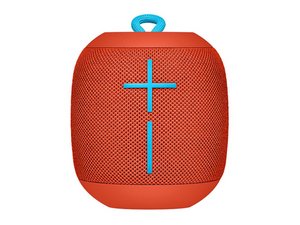
The Wonderboom is a Bluetooth portable speaker from Ultimate Ears. Released in 2017. Model number: 984-000839.

Stopped Connecting to Bluetooth

My UE Boom used to work fine with my ipad (4 yr old) and my iPhone 6s. My bf synced it to his iwatch, and phone, works for him but I can’t connect any longer. He is now in a different state, I “forgot” all my devices on both phone and iPad, neither will connect, it just doesn’t “find” the Wonderboom. What the heck? Why did it stop working and how can I fix it. Does this have to do with being/having an Alexa/Siri remote functionality?

Answer this question I have this problem too

Is this a good question?

Score 1
Add a comment

2 Answers

Most Helpful Answer

Open the Settings > Bluetooth within your iPad. Turn on the WonderBoom you should see a lit line, now other the other side is a small blister press and hold it, it will light up and the speaker will make a new noise. Now look at the Bluetooth other devices you should see it, click on it to add it to your list of Bluetooth devices. If your WonderBoom is already listed press on the ‘Not Connected’ to enable it. It’s that simple!

Was this answer helpful?

Score 1

1 Comment:

Thank thank, thank you!!!!

by

Add a comment

Simple fix… press and hold the volumn button on the wonderboom , the minus one, while holding the power button til it turns off ; now turn on the WB and pairing mode, restart the bluetooth in iphone and … shazammmmmm you’re welcome!

Was this answer helpful?

Score -1
Add a comment

Add your answer

Kari Iverson will be eternally grateful.
View Statistics:

Past 24 Hours: 0

Past 7 Days: 2

Past 30 Days: 9

All Time: 2,029

