Repair Guides
Learn how to fix just about anything with our step-by-step guides.
App
Your pocket repair helper.
FixBot
The friendly AI repair assistant.
Repairability
Learn why fixable products make sense.
Teardowns
Get a sneak peek inside the latest gadgets.
Answers Forum
Share solutions and get help from a friend.
Find Your Community
Find teams, events, and fellow fixers.
Help Out
Help make repair knowledge free and accessible for everyone.
Right to Repair
Learn about the Right to Repair movement and how to be an advocate.
Featured
Quality parts and tools backed by our lifetime guarantee.
Tools
Shop our wide selection of precision tools.
Parts
Shop parts backed by our quality guarantee.
iPhone Batteries
Batteries tested and guaranteed plus a kit with everything you need.
Free Shipping on Domestic Orders $75+
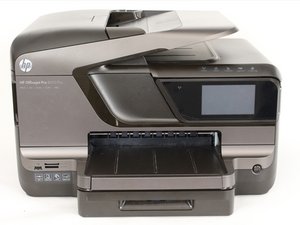
The HP Officejet Pro 8600 Plus is identifiable by its model number: N911g. Released in 2011, the printer can be identified by its brown finish and touchscreen control panel.
Richard Harris @rh001
Rep: 1
Posted: Apr 22, 2018
Documents will not feed
Is this a good question?
1 Comment:
Hi @rh001 ,
A bit more detail will help us to help you.
What are you trying to do?
For example are you trying to copy documents by loading them in the ADF or in the paper tray?
If so what is the type of document i.e. what is the paper thickness and size etc?
What make and model is the computer that the printer is connected to if you are wanting to print to the documents that "will not feed"?
Apr 23, 2018 by jayeff
Past 24 Hours: 0
Past 7 Days: 2
Past 30 Days: 9
All Time: 228


Hi @rh001 ,
A bit more detail will help us to help you.
What are you trying to do?
For example are you trying to copy documents by loading them in the ADF or in the paper tray?
If so what is the type of document i.e. what is the paper thickness and size etc?
What make and model is the computer that the printer is connected to if you are wanting to print to the documents that "will not feed"?
by jayeff