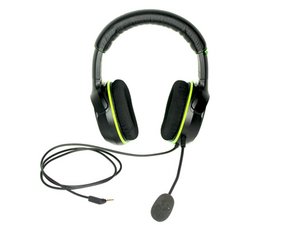
Student-Contributed Wiki
An awesome team of students from our education program made this wiki.
Find the device page here.
Headphones won't turn on
No matter what you do, your headphones won't turn on.
Xbox One controller is off
To make sure the controller is on, hold the middle button on the controller for 3 seconds.
Drained/bad batteries
If your headphones won't turn on, you may simply have drained batteries in your Xbox One controller. Try replacing the two AA batteries in the controller.
Controller isn't connected to Xbox One
Make sure the controller is synced with the Xbox One. To do this, simultaneously press the button on top of the controller with three arrows and the button on the side of the Xbox One with the same symbol.
Audio Adapter is Faulty
If all cables are connected firmly, there might be a problem with a component in the audio adapter. To replace one of these components, refer to the Audio Adapter Replacement Guide.
No sound from one or both speakers
You're not hearing any sound coming from the speakers, even though you should be.
Faulty auxiliary cable
Check to make sure the auxiliary cable is firmly connected to the audio adapter and the audio adapter is firmly connected to the controller.
Volume is off
Make sure the volume is turned on by pressing the '+' symbol a few times on the audio adapter.
Faulty speakers
One or both speakers may be faulty or blown out and need replaced. To do this, refer to the Speaker Cone Replacement Guide.
Microphone doesn't work
Although you are speaking directly into the microphone, no sound is transmitted to the other players.
Microphone is not fully plugged in
Make sure the microphone is connected firmly to the jack at the bottom of the left speaker.
Mute button is on
Press the middle button on the audio adapter to make sure the mute setting isn't on.
Faulty microphone
If the above solutions didn't help, the microphone or its wires may be broken and need to be replaced. To do this, refer to the Microphone Replacement Guide.
Headset is uncomfortable or does not fit
Headband is not adjusted correctly
If the headphones do not fit on your head, try adjusting the headband to increase or decrease the size.
Ear cushions are cracked or uncomfortable
If the ear cushions need to be replaced for any reason, refer to the Ear Cushion Replacement Guide.
Mute button doesn't work
Even when the mute button is on, your voice is still picked up by the speaker.
Faulty mute button
Most likely the mute button is faulty and the audio adapter needs to be replaced. However, if you don't want to buy another audio adapter, you can simply unplug the speaker from the headphones.

Team

Baylor, Team 10-14, Williams Fall 2015 Member of Baylor, Team 10-14, Williams Fall 2015
BU-WILLIAMS-F15S10G14
3 Members
48 Guides authored

2 Comments
My headphones aren’t working properly… the right speaker seems to be half the sound as the other. Any ideas?
ashleysmith1995 - Reply Share
I know that this is dumb but I literally cannot unlock the mic to remove it can someone pls help me
zakee khan - Reply Share