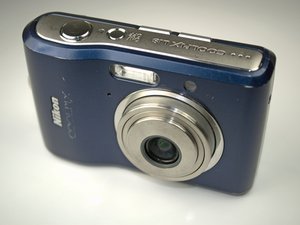
Camera turns off unexpectedly
Battery is exhausted
The batteries may be dead. Replace them with a fresh pair and try to turn on the camera.
This camera uses the following size AA batteries:
• Two LR6 alkaline batteries (batteries supplied)
• Two FR6/L91 lithium batteries
• Two ZR6 oxyride batteries
• Two Nikon EN-MH1
Power Saver Mode
After 30 seconds, the camera will go into a power saver mode, making the screen go blank. After three minutes, the camera will turn off automatically. Turn it back on to continue shooting.
Camera lens does not extend
Battery is exhausted
Remove and insert a fresh set of batteries. As camera turns on hold down OK button to realign the lens.
Misaligned Lens
Focus on a far away wall to extend the lens fully before retracting it again to realign the lens at the closer point.
Sand and Grit
Sand and grit can accumulate in the lens over time. Use compressed air (or your hair dryer without heat) to blow out any sediment caught in the device.
Monitor is blank
Battery is exhausted
The batteries may be dead. Replace them with a fresh pair and try to turn on the camera.
Stand by mode for saving power
If no operations are performed for about five seconds, the monitor will dim to save power. Using any of the camera controls will reactivate the display.
Camera and computer are connected
Verify that the camera is connected to a computer. If so, disconnect the camera from the USB cable and test the power button.
Hardware Problem
The LCD screen may be disconnected internally, refer to the LCD Repair Guide.
Locked Pictures
Camera setting
Enter MENU and select SETUP. Select PROTECT option then go to locked pictures (they will have a key icon in the upper corner), press up/down to lock/unlock photos.
SD card
Verify that the SD card is in the open position as indicated by a switch along on edge. Slide switch closest to contact bars. If already in the right position, slide the switch down and back again before reinserting the SD card into the camera.

Team

Cal Poly, Team 9-23, Regan Fall 2010 Member of Cal Poly, Team 9-23, Regan Fall 2010
CPSU-REGAN-F10S9G23
4 Members
60 Guides authored

3 Comments
My lens is open and will not close.
hodge125 - Reply Share
"this card cannot be used" shows up on the screen
Jean Macdonald - Reply Share
It says lens error
simon addai - Reply Share