Student-Contributed Wiki
An awesome team of students from our education program made this wiki.
Device Easily Broken
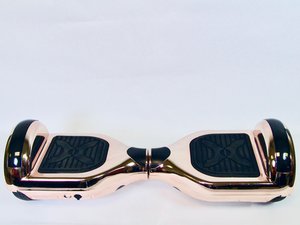
The Hover-1 Matrix hoverboard is damaged externally or internally that is unable to perform its use.
Scratches and Cracks on surface
Scratches and cracks are caused when the hover board runs in to hard surfaces. To solve this problem, avoid running into hard surfaces such as curbs. These hard surfaces may leave scratches on the shell or crack the shell.
Riding Too Slow
This may be caused by the damages to the motherboard. To avoid this problem, do not expose the device to liquid, moisture, or humidity to avoid damage to the product's internal circuity.
Device Stops Suddenly
The Hover-1 Matrix may suddenly stop or unable to move during riding.
Low Charge
When the hoverboard has little or no battery, it may stop during operation. To solve this problem, fully charge the hoverboard before operating. To ensure the hoverboard is charging, make sure the power adapter is plugged in and the charge light is on.
Only One Wheel is Operating
The hoverboard is weight sensitive. Make sure to keep both feet on paddles, so paddles can detect the weight and then the hoverboard will operate.
Hoverboard Unbalanced
The user unable to stand up properly on the hoverboard.
Difficult to Balance
This problem can be solved by resetting the calibration.
Please follow the steps below to recalibrate your Hover-1 Matrix
1) Place the board on a flat surface - make sure the board is completely level
2) Starting with board powered off, press and hold the power button for 10-15 seconds - The fender lights will blink red and the board will beep
3) Release the power button
4) Turn the board Off
5) Turn the board back on
Hover Board Not Smooth When Riding
The Hover-1 Matrix riding process may shaking and produce noises.
Difficult to Ride at a Steady Pace
When tires are overused, their surface may be un-smooth, causing dangerous riding experience. To solve this problem, replace tires. New tires can be purchased here.

Team

UC Davis, Team S7-G2, Lore Fall 2018 Member of UC Davis, Team S7-G2, Lore Fall 2018
UCD-LORE-F18S7G2
3 Members
48 Guides authored

6 Comments
Hoverboard will not charge. It makes sounds when plugged up but will not charge. I have tried other chargers for the same product and nothing works.
Scott Sears - Reply Share
Just got it today charged it full charge turned it on only one side will light up when you get on it. Tried calibrating but still want work
sheriharris111 - Reply Share
Mine will also not charge
Devin Clark - Reply Share
Just keeps beeping. It’s brand new and when I plug charger in. Nothing happens. No lights nothing
Devin Clark - Reply Share
I got the hoverboard for my daughters and didn’t last 3 months now it won’t charge or turn on. 200+ dls for it not to work. Anyone has an idea on what it could be???
Ruby Hawkins - Reply Share