
Student-Contributed Wiki
An awesome team of students from our education program made this wiki.
Common PS4 Controller Problems
Diagnose and fix the most common problems plaguing your PS4 controller with these step-by-step DIY troubleshooting guides.
| 2 Solutions | DualShock 4 Buttons Sticking |
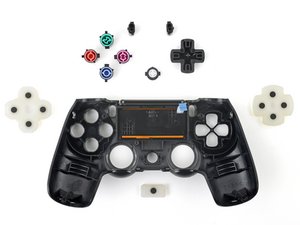 | The controller buttons are stuck in the pressed position. Potential causes include dirt and debris in the button crevices or faulty buttons. View all causes and solutions. |
| 6 Solutions | DualShock 4 Not Vibrating |
 | The controller does not vibrate. Potential causes include a faulty battery, faulty motors, the vibration feature is turned off, a general controller malfunction, or a poor wireless connection between the PS4 and controller. View all causes and solutions. |
| 3 Solutions | DualShock 4 Won't Turn On |
 | The controller won't power on. Potential causes include a discharged battery, a faulty charger, a faulty battery, or a general controller malfunction. View all causes and solutions. |
| 3 Solutions | DualShock 4 Touchpad Not Working |
 | The touchpad doesn't respond. Potential causes include a faulty touchpad, incompatible game, out of date software, or a general firmware glitch. View all causes and solutions. |
| 2 Solutions | DualShock 4 Analog Sticks Locked in Place |
 | The analog sticks get stuck when pressed down and won’t come back up. Potential causes include dirt and debris in the joystick crevices or a broken or bent joystick. View all causes and solutions. |
| 4 Solutions | DualShock 4 Not Charging |
 | The controller doesn't charge and the light on the front of the controller doesn’t turn on. Potential causes include a general firmware malfunction, a faulty battery, a defective charging cable, or a defective controller charging port. View all causes and solutions. |
| 2 Solutions | DualShock 4 Won't Connect to Console |
 | The controller is on and working, but cannot connect to the console. Potential causes include a general firmware malfunction or a WiFi router limiting connectivity. View all causes and solutions. |
| 2 Solutions | DualShock 4 No Sound |
 | The controller does not emit any audio from its speaker system. Potential causes include the controller's volume not being turned up, or a general firmware glitch. View all causes and solutions. |
Didn't find your problem?
Check out the Answers forum for more troubleshooting help for your specific issue. Maybe someone has already solved the same issue you are experiencing.

Team

Cal Poly, Team 6-21, Maness Winter 2014 Member of Cal Poly, Team 6-21, Maness Winter 2014
CPSU-MANESS-W14S6G21
4 Members
84 Guides authored

159 Comments
My command buttons on my DualShock4 do not respond, even after a manual reset. The controller can still turn on the PS4 though. Do I just need to replace the controller entirely, as I do not want to waste time to try and fix it myself.
mantronik - Reply Share
I learned that if your buttons are sticky, brush them with a slightly wet toothbrush. Let it sit for a couple of seconds then dry them.
John - Reply Share
A In Depth Guide to fixing DS4 Connection Issues.
1. Put your DS4 in pairing mode by holding PS button and share simultaneously. The light bar should begin to flash white.
2. Connect the DS4 to the device via Bluetooth on any of the following devices. ( PC, Android, PS3 )
3. Disconnect the DS4 from the paired Bluetooth device. Make sure you disconnect directly from the bluetooth device. Once disconnected locate a pin or a small narrow object and push into the reset hole on the rear of the DS4. Hold in place for 10 seconds.
4. Connect the USB cable to the DS4 and proceed to power on the PS4. Once the system has loaded to the login screen it will ask you to press the PlayStation Button. This will iniate pairing between the DS4 and PS4. The DS4 should now be fully operable.
Make sure to follow steps exactly for best results.
4wrd4evr - Reply Share
My ps4 controller makes à strange doubleclicking sound when i'm touching
The touchpad iT sounds like THE touchpad is à littlebit loose do you know how you change that
Ps sorry for THE bad english
Benjamin - Reply Share
when i open my ps4 the controller starts to flash (like it tries to connect with the ps4) but the it turns orange and does not connect eventually.
Elisavet Parra - Reply Share