Free Shipping on Domestic Orders $75+

Introduction

Go to step 1 ↓

Funded on August 29, 2015, with $1,647,155 raised of the $50,000 goal, the Remix Mini is presented as the world's smallest Android PC, and the first of its kind.

With its extensive connectivity, custom OS, and attractive price, the Remix Mini has everything to please, at least in appearance. Let's explore more closely how the engineers at Jide designed this strange pebble...

And since it is quite beautiful this month of December 2015, this entire teardown will take place outdoors :)

What you need

Tools

This teardown is not a repair guide. To repair your Remix Mini, use our service manual.

    1. Remix Mini Teardown, introduction: step 1, image 1 of 2 Remix Mini Teardown, introduction: step 1, image 2 of 2
      • Strange? That's actually the word that comes to mind when you see this little black pebble. Behind this unusual design, there is a true Android configuration built for web browsing, word processing, or even some games.

      • The box is made of recycled cardboard, classic in view of current trends, but always pleasant.

      Ask FixBot

      Add Comment

    2. Remix Mini Teardown: step 2, image 1 of 2 Remix Mini Teardown: step 2, image 2 of 2
      • on top of the device, we have the "Remix" logo, also used as a sensitive power switch.

      • below we have several informations (device model, certifications, serial number), all surrounded by a rubber pad, used to keep the device steady

      Ask FixBot

      Add Comment

    3. Remix Mini Teardown: step 3, image 1 of 1
      • Behind we have all the I/O ports, which are:

      • Two USB 2.0 ports

      • Ethernet port

      • HDMI port up to 1920x1080 FHD, also multichannel audio decoding

      • Micro SD card reader up to 64GB

      • Headphone stereo 3,5mm output who supports microphone input

      • 5V 2A Power input

      • as Remix mini is shipped as a all in one solution, 5V power supply is included in the box

      Ask FixBot

      Add Comment

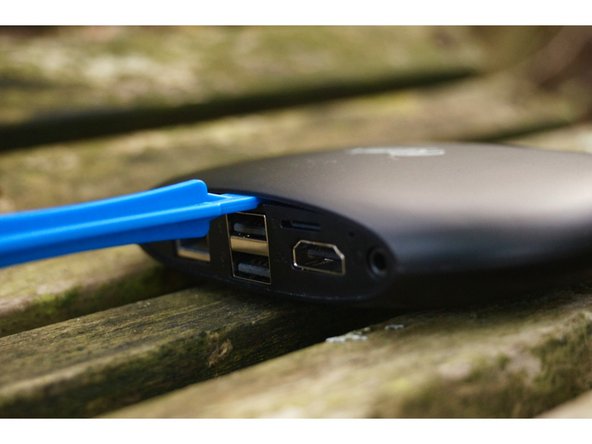
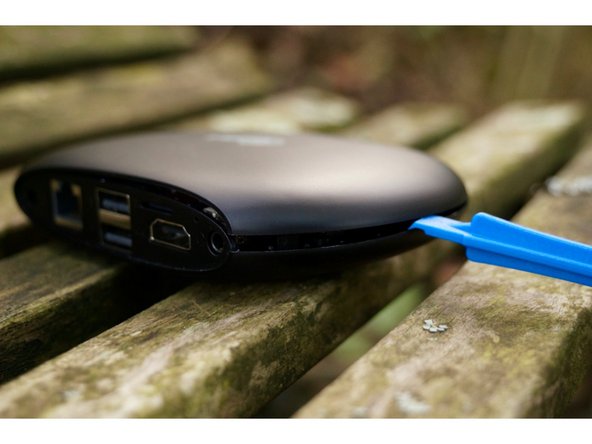
    4. Remix Mini Teardown: step 4, image 1 of 3 Remix Mini Teardown: step 4, image 2 of 3 Remix Mini Teardown: step 4, image 3 of 3
      • It's time to get inside !

      • First of all, wee need to take off the rubber pad at the bottom, which is hidding tow Philips screws

      • thanks to the unbreakable iFixit blue spudger, we need to separate the upside part and the downside part of the case.

      Ask FixBot

      Add Comment

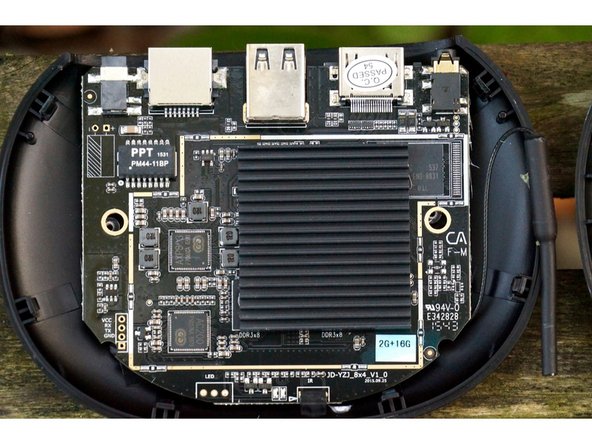
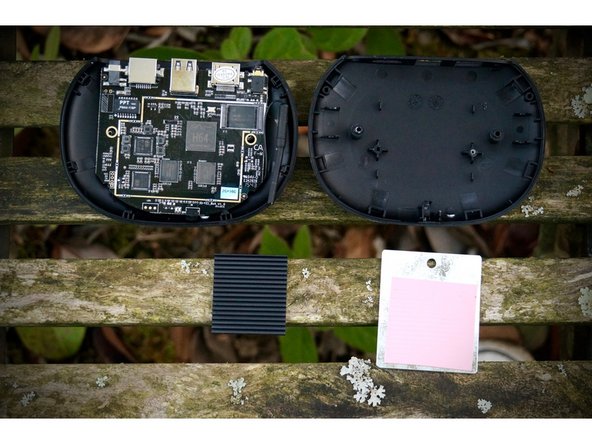
    5. Remix Mini Teardown: step 5, image 1 of 3 Remix Mini Teardown: step 5, image 2 of 3 Remix Mini Teardown: step 5, image 3 of 3
      • Be careful to not detach the power switch cable located on top of the device, and connected to the motherboard

      • once the case is fully separated, all we need to do is carefully open the device to show on the first components.

      Ask FixBot
      Add Comment

    6. Remix Mini Teardown: step 6, image 1 of 2 Remix Mini Teardown: step 6, image 2 of 2
      • Let's look at the first components visible on this motherboard:

      • The Sk Hynix DDR3L SDRAM modules of 4Gb each (i.e., 512 MB per module).

      • The Wi-Fi b/g/n and Bluetooth 4.0 controller.

      • The power button connector (soldered).

      • The Wi-Fi antenna is located on the side of the device.

      Ask FixBot

      Add Comment

    7. Remix Mini Teardown: step 7, image 1 of 3 Remix Mini Teardown: step 7, image 2 of 3 Remix Mini Teardown: step 7, image 3 of 3
      • Now let's flip the motherboard over to observe the rest of the components:

      • First, we notice that the lower part (on the right) only contains a metal piece and a cooling pad. If you remove this, you will notice that the device is significantly lighter. This piece, besides serving as an additional heat sink, was surely chosen to add weight to the device.

      Ask FixBot

      Add Comment

    8. Remix Mini Teardown: step 8, image 1 of 1
      • On the motherboard, we notice a large passive radiator, surely intended to dissipate the heat generated by the processor.

      • Including such a heatsink is a good thing, as mobile components do have a tendency to heat up. This will not only extend its lifespan, but also and above all prevent frequency throttling due to excessively high temperatures.

      Ask FixBot

      Add Comment

    9. Remix Mini Teardown: step 9, image 1 of 2 Remix Mini Teardown: step 9, image 2 of 2
      • Let's move on to the components on the motherboard:

      • Allwinner H64 processor based on the 1.2 GHz quad-core Cortex-A53 architecture

      • Samsung 16GB eMMC flash storage

      • SK Hynix DDR3L SDRAM modules of 4 Gb each (or 512 MB per module). The total RAM is thus brought to 2 GB

      • AXP 803 USB controller

      • Infrared module

      • Activity LED

      • It was not possible to find information regarding the two remaining modules, namely the PM44-11BP (likely the audio amplifier), and the AC200.

      Ask FixBot

      Add Comment

    10. Remix Mini Teardown, Conclusion: step 10, image 1 of 1
      • In short, this small Android PC retains the main features of a mid-range phone, but with a few additional options (USB, HDMI, Ethernet, Desktop OS...). Moreover, it manages the feat of bringing it all together at a very aggressive price ($70).

      • We will not provide a repairability score, as this type of device is not really designed to be upgraded or repaired.

      Ask FixBot

      Add Comment

Special thanks to these translators:

fr en

100%

Subject42 is helping us fix the world! Want to contribute?
Start translating ›

Subject42

Member since: 08/28/14

3,060 Reputation

4 Guides authored

0 Guide Comments

Add Comment

View Statistics:

Past 24 Hours: 2

Past 7 Days: 8

Past 30 Days: 33

All Time: 1,878