Introduction
This guide will show how to open the KORG Volca Sample and explain how things work inside.
What you need
-
-
Remove seven Screws.
-
Then turn the Volca around. You can now remove the two PCBs. Take care with the loudspeaker cable and the battery cable. In my picture the black cable is already loose.
 Ask FixBot
-
-
-
This is the main processor. It is an Cypress FM4-Series MB9BF164L.
-
25Q03213
-
The DAC. AKM4384FT.
-
MV3241 / 49AG3 / P220
-
-
-
-
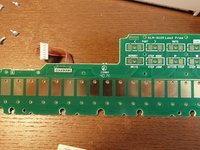
This is how working buttons should look like.
-
If this isn't the case, clean these parts with a Q-Tip dipped in isopropanol.
-
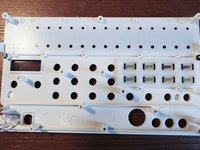
Clean these parts as well.
-
-
-
Here is a complete overview of the PCB containing the Step Touch Buttons and the FUNC and WRITE buttons
-



27 Guide Comments
Hello, thanks for this post. I have an issue with my volca sample, only sound left is outputting. can you show me where the audio jack output circuit is ? Would be much appreciated. I think it’s a spike made by my soundcard while turnung it on that caused this issue.
Hi,
My Volca Sample LCD is dimmed (knob lights are not working too, however button lights works) after accidentally liquid spill. Everything else is fine. Can you give me some tip about dimmed LCD? Tnx
Hello!! I have an issue with my VS. The Button 7 keeps triggering without no reason and is a pain in the ass. I opened the VS and cleaned all the pads ans circuits but doesn´t seem to do anything. :(
