Free Shipping on Domestic Orders $75+

why! W670SZQ1 Replacement CD / DVD Drive

What you need

    1. why! W670SZQ1 Replacement CD / DVD Drive, The Batteries: step 1, image 1 of 3 why! W670SZQ1 Replacement CD / DVD Drive, The Batteries: step 1, image 2 of 3 why! W670SZQ1 Replacement CD / DVD Drive, The Batteries: step 1, image 3 of 3
      • Unlock the lock latch on the left.

      • Unlock the lock latch on the right.

      • Remove the battery while holding the lock latch unlocked.

      Ask FixBot

      Add Comment

    1. why! W670SZQ1 Replacement CD / DVD Drive, Access to Major Components: step 2, image 1 of 3 why! W670SZQ1 Replacement CD / DVD Drive, Access to Major Components: step 2, image 2 of 3 why! W670SZQ1 Replacement CD / DVD Drive, Access to Major Components: step 2, image 3 of 3
      • Using the Philips # 0 screwdriver, unscrew the 2 screws from the bottom cover.

      • Lift the bottom right cover with the iFixit Opening Tool.

      • Lift the lower left cover with the iFixit Opening Tool.

      • Finally clear the bottom cover completely to access the main components.

      Ask FixBot

      Add Comment

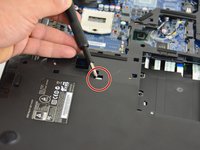
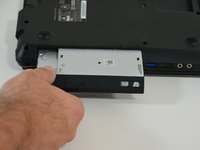
    1. why! W670SZQ1 Replacement CD / DVD Drive, CD / DVD player: step 3, image 1 of 2 why! W670SZQ1 Replacement CD / DVD Drive, CD / DVD player: step 3, image 2 of 2
      • Locate the screw that secures the CD / DVD drive. With the Philips screwdriver unscrew this one.

      • Finally remove the CD / DVD drive from its location.

      Ask FixBot

      Add Comment

Conclusion

TO REASSEMBLE YOUR DEVICE FOLLOW THESE INSTRUCTION IN REVERSE ORDER.

Cancel: I did not complete this guide.

One other person completed this guide.

Special thanks to these translators:

fr en

100%

irlanda is helping us fix the world! Want to contribute?
Start translating ›

Felice Suglia

Member since: 06/15/13

33,634 Reputation

283 Guides authored

0 Guide Comments

Add Comment

View Statistics:

Past 24 Hours: 1

Past 7 Days: 4

Past 30 Days: 26

All Time: 486