Free Shipping on Domestic Orders $75+

This translation may not reflect the most recent updates from the source guide. Help update the translation or view the source guide.

why! N650DU RAM Memory

What you need

    1. why! N650DU RAM Memory, The Batteries: step 1, image 1 of 3 why! N650DU RAM Memory, The Batteries: step 1, image 2 of 3 why! N650DU RAM Memory, The Batteries: step 1, image 3 of 3
      • Unlock the button without spring

      • Slide the battery up while unlocking the button with spring

      Ask FixBot

      Add Comment

    1. why! N650DU RAM Memory, Access to major components: step 2, image 1 of 3 why! N650DU RAM Memory, Access to major components: step 2, image 2 of 3 why! N650DU RAM Memory, Access to major components: step 2, image 3 of 3
      • Unscrew the two large screws circled in red

      • Unscrew the two small screws circled in green

      • Slide the plate down and lift the

      Ask FixBot

      Add Comment

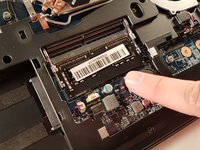
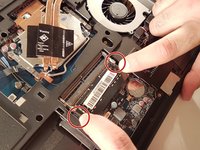
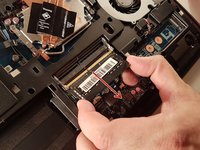
    1. why! N650DU RAM Memory, RAM memory: step 3, image 1 of 3 why! N650DU RAM Memory, RAM memory: step 3, image 2 of 3 why! N650DU RAM Memory, RAM memory: step 3, image 3 of 3
      • Spread the two arms holding the RAM bar

      • Remove the RAM card

      Ask FixBot

      Add Comment

Conclusion

To reassemble your device, follow the instructions in reverse order.

Cancel: I did not complete this guide.

Special thanks to these translators:

fr en

75%

irlanda is helping us fix the world! Want to contribute?
Start translating ›

Felice Suglia

Member since: 06/15/13

33,634 Reputation

283 Guides authored

0 Guide Comments

Add Comment

View Statistics:

Past 24 Hours: 2

Past 7 Days: 6

Past 30 Days: 35

All Time: 549