This translation was generated by a machine and has not been reviewed by a person yet. Speak this language? Review it.
Introduction
This guide shows you how to replace the cooling fan on a why! N240BU laptop, for example in case of device overheating or abnormal noise.
What you need
-
-
-
Start by unlocking the right locking latch.
-
Then, by simultaneously unlocking the left latch, lift the battery out of its socket.
 Ask FixBot
-
-
-
-
-
Begin by spotting the dummy memory card.
-
Then, remove it and put it on your workplan.
-
-
-
-
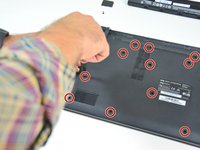
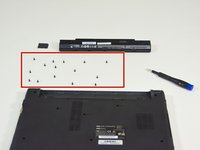
Locate the 15 screws that hold the bottom cover of the device in place.
-
Unscrew them and place them on your work surface.
-
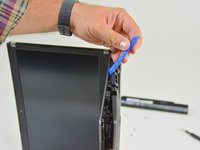
Then, un-clip the bottom cover, starting with the side shown in the third picture.
-
-
-
-
-
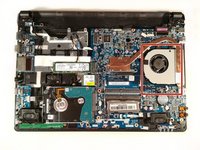
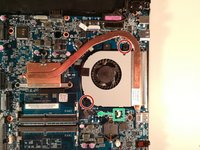
Remove the two screws circled in red.
-
Disconnect the connector boxed in green in the direction of the green arrow.
-
Remove the cooling fan by lifting it up.
-
-




To reassemble your device, follow the instructions in reverse order
Special thanks to these translators:
100%


These translators are helping us fix the world! Want to contribute?
Start translating ›

