Free Shipping on Domestic Orders $75+

the Nokia 6230b Camera Replacement

What you need

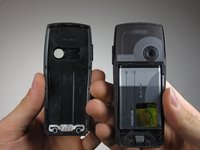
    1. the Nokia 6230b Camera Replacement, Back Cover: step 1, image 1 of 1
      • Press down the button on the back panel.

      Ask FixBot

      Add Comment

    2. the Nokia 6230b Camera Replacement: step 2, image 1 of 2 the Nokia 6230b Camera Replacement: step 2, image 2 of 2
      • Push the back cover upwards.

      Ask FixBot

      Add Comment

    3. the Nokia 6230b Camera Replacement: step 3, image 1 of 2 the Nokia 6230b Camera Replacement: step 3, image 2 of 2
      • Remove the back cover from the phone.

      Ask FixBot

      Add Comment

    1. the Nokia 6230b Camera Replacement, Front Cover: step 4, image 1 of 1
      • Press the silver button on the top of the phone.

      Ask FixBot

      Add Comment

    2. the Nokia 6230b Camera Replacement: step 5, image 1 of 1
      • Slide your thumbnail down the case seam to separate the rest of the case.

      Ask FixBot

      Add Comment

    3. the Nokia 6230b Camera Replacement: step 6, image 1 of 1
      • Gently remove the case.

      • Careful! Do not bend the plastic tabs.

      Ask FixBot

      Add Comment

    1. the Nokia 6230b Camera Replacement, Motherboard: step 7, image 1 of 2 the Nokia 6230b Camera Replacement, Motherboard: step 7, image 2 of 2
      • Using a T6 Torx Screwdriver, unscrew and remove the six screws shown in the picture.

      Ask FixBot

      Add Comment

    2. the Nokia 6230b Camera Replacement: step 8, image 1 of 2 the Nokia 6230b Camera Replacement: step 8, image 2 of 2
      • Remove the panel that covers the motherboard.

      • If replacing the speaker, stop at this step and skip forward to the first step of the speaker guide.

      Ask FixBot

      Add Comment

    3. the Nokia 6230b Camera Replacement: step 9, image 1 of 1
      • Remove the LCD screen frame.

      Ask FixBot

      Add Comment

    4. the Nokia 6230b Camera Replacement: step 10, image 1 of 1
      • Remove the motherboard.

      Ask FixBot

      Add Comment

    1. the Nokia 6230b Camera Replacement, Camera: step 11, image 1 of 1
      • Locate the camera on the circuit board.

      Ask FixBot

      Add Comment

    2. the Nokia 6230b Camera Replacement: step 12, image 1 of 1
      • Place the circuit board on a firm, static free surface (no cloth/carpet).

      • NOTE: The circled alignment notch points to the left.

      Ask FixBot

      Add Comment

    3. the Nokia 6230b Camera Replacement: step 13, image 1 of 1
      • Pull the left holding tabs to the left.

      Ask FixBot

      Add Comment

    4. the Nokia 6230b Camera Replacement: step 14, image 1 of 1
      • Lift out the left side of the camera.

      Ask FixBot

      Add Comment

    5. the Nokia 6230b Camera Replacement: step 15, image 1 of 1
      • Pull the right holding tabs to the right.

      Ask FixBot

      Add Comment

    6. the Nokia 6230b Camera Replacement: step 16, image 1 of 1
      • Pull camera off of board.

      Ask FixBot

      Add Comment

Conclusion

To reassemble your device, follow these instructions in reverse order.

Cancel: I did not complete this guide.

2 other people completed this guide.

Job Jao

Member since: 10/08/10

37 Reputation

2 Guides authored

Team

Cal Poly, Team 3-27, Regan Fall 2010 Member of Cal Poly, Team 3-27, Regan Fall 2010

CPSU-REGAN-F10S3G27

4 Members

105 Guides authored

0 Guide Comments

Add Comment

View Statistics:

Past 24 Hours: 3

Past 7 Days: 10

Past 30 Days: 37

All Time: 2,310