Introduction
This guide is in case the battery for the iRobot Roomba 980 has failed to work or is performing poorly. It may be defective, damaged during use or reached the end of its charging life-cycle. Replacing the battery is a quick and easy process that will not take much time away from your daily routine.
What you need
-
-
-
Flip over the device and remove the two 11.5 mm screws using the Phillips #1 screwdriver.
 Ask FixBot
-
-
-
-
Unscrew the back plate using a Phillips #1 screwdriver.
-
Carefully lift the panel up once the screws are removed.
-
-
-
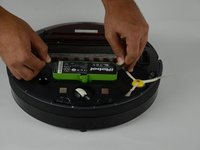
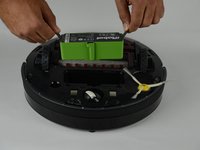
With both hands, grab the two black tabs on each end of the battery.
-
Pull the tabs upwards to remove the battery.
-
-


To reassemble your device, follow these instructions in reverse order.
Cancel: I did not complete this guide.
4 other people completed this guide.

Team

USF Tampa, Team S14-G2, Boczar Fall 2017 Member of USF Tampa, Team S14-G2, Boczar Fall 2017
USFT-BOCZAR-F17S14G2
4 Members
60 Guides authored
