Free Shipping on Domestic Orders $75+

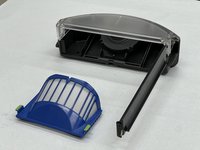
iRobot Roomba 692 Filter Replacement

What you need

    1. iRobot Roomba 692 Filter Replacement, Dustbin: step 1, image 1 of 1
      • Rotate the Roomba so that the "R" on top is facing toward you

      • Press the button at the bottom of the Roomba

      Ask FixBot

      Add Comment

    2. iRobot Roomba 692 Filter Replacement: step 2, image 1 of 3 iRobot Roomba 692 Filter Replacement: step 2, image 2 of 3 iRobot Roomba 692 Filter Replacement: step 2, image 3 of 3
      • Press down on the button and lightly pull until the dustbin is fully removed from the Roomba.

      Ask FixBot

      Add Comment

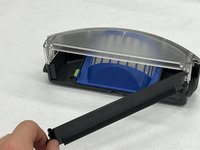
    3. iRobot Roomba 692 Filter Replacement: step 3, image 1 of 1
      • Pull on the yellow tab to open the filter latch.

      • The dustbin can now be emptied or cleaned.

      Ask FixBot

      Add Comment

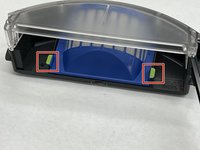
    1. iRobot Roomba 692 Filter Replacement, Filter: step 4, image 1 of 2 iRobot Roomba 692 Filter Replacement, Filter: step 4, image 2 of 2
      • Flip over the dustbin so that the clear side is facing upward.

      • Now the green tabs to remove the filter are visible.

      Ask FixBot

      Add Comment

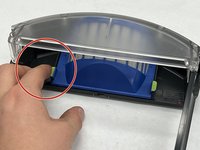
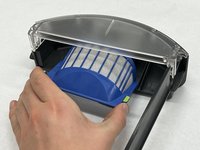
    2. iRobot Roomba 692 Filter Replacement: step 5, image 1 of 3 iRobot Roomba 692 Filter Replacement: step 5, image 2 of 3 iRobot Roomba 692 Filter Replacement: step 5, image 3 of 3
      • Pinch and pull up on the green tabs with index finger and thumb.

      Ask FixBot

      Add Comment

Conclusion

This guide will help you replace filter from dustbin.

Cancel: I did not complete this guide.

Ruth Oliva

Member since: 11/08/23

217 Reputation

2 Guides authored

Team

IUPUI, Team 1-1, Harley Fall 2023 Member of IUPUI, Team 1-1, Harley Fall 2023

IUPUI-HARLEY-F23S1G1

4 Members

36 Guides authored

0 Guide Comments

Add Comment

View Statistics:

Past 24 Hours: 1

Past 7 Days: 6

Past 30 Days: 23

All Time: 474