Introduction
This guide will teach you how to access, remove, clean, and replace your iRobot Roomba 692 brushes. If you are completely replacing the brushes, ensure that you have the right brushes for the Roomba 692.
Remember to review the iRobot Roomba 692 Troubleshooting Page before attempting any maintenance or repairs on your vacuum.
What you need
-
-
-
To access the iRobot Roomba 692 battery compartment, flip your iRobot Roomba 692 upside down.
-
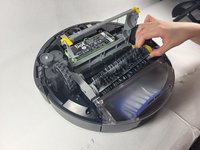
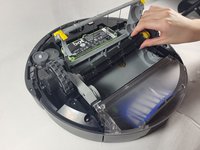
Press on the yellow tabs on the corners of the brush guard.
 Ask FixBot
-
-
-
-
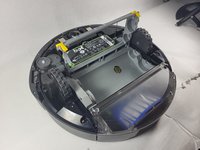
Hold each brush from the yellow end and pull each up and out of the compartment.
-
-


To reassemble your device, follow these instructions in reverse order.
Cancel: I did not complete this guide.
One other person completed this guide.

Team

UMass Dartmouth, Team 1-4, Shaddix Spring 2023 Member of UMass Dartmouth, Team 1-4, Shaddix Spring 2023
UMASSD-SHADDIX-S23S1G4
4 Members
60 Guides authored
